Budget Production Quantities
Agave Sync allows you to sync Vista Budget Production Quantities to Procore Budget Production Quantities.
Visual Mapping
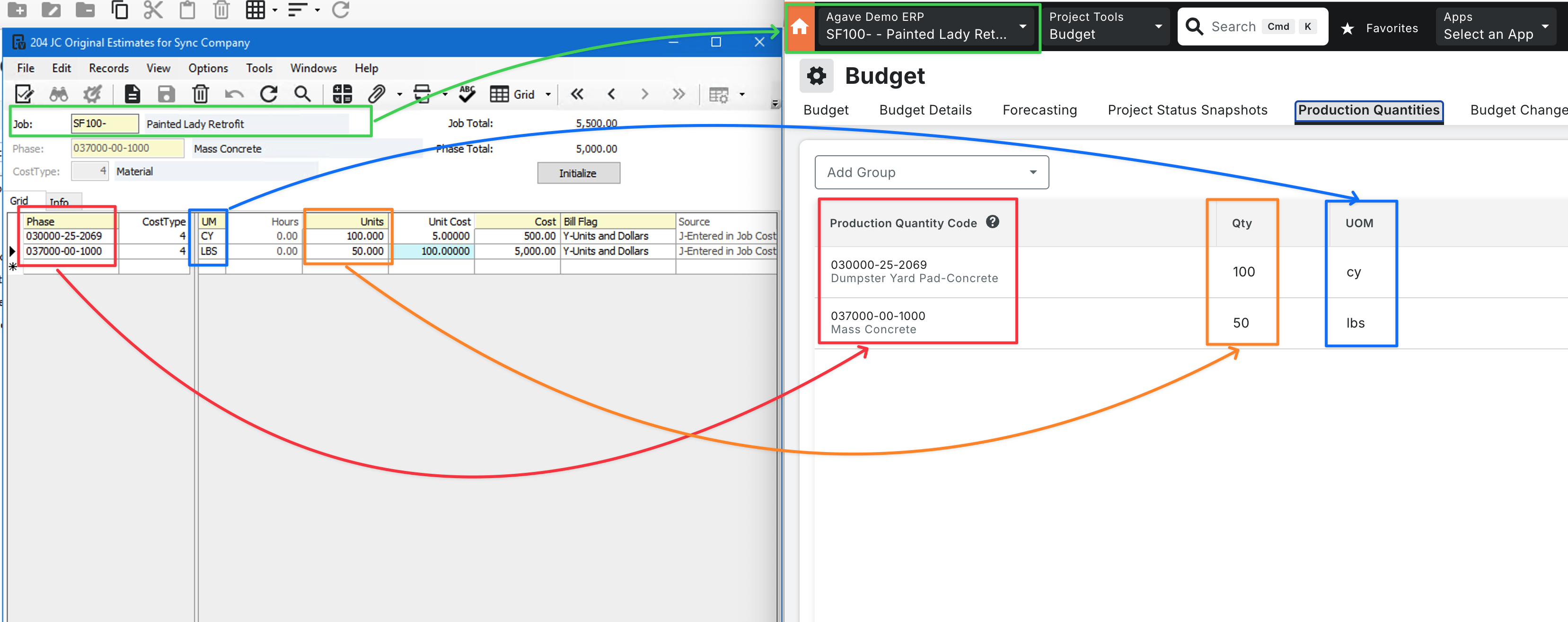
Vista tracks budgeted production quantities by Phase and Cost Type. Procore tracks them by Cost Code and Unit of Measure, not by cost type. Agave combines Vista quantities across cost types for each Phase before syncing to Procore, so one Procore record represents the total budgeted quantity for that cost code.
Supported Sync Direction
| Direction | Supported |
|---|---|
| Vista → Procore | Yes |
| Procore → Vista | No |
Prerequisites
Before syncing Budget Production Quantities, confirm the following:
- Production Quantities must be enabled in Procore. Go to Project → Budget Tools (Admin) → Advanced Settings → Labor Productivity for Budget, Change Events, and Change Orders, then click Update after enabling the setting.
- Cost Codes must be synced. Agave maps Vista Phases to Procore Cost Codes. If cost codes are not linked, the sync will fail to match records.
Exporting Budget Production Quantities to Procore
Step 1: Enter Quantities in Vista
Enter your budgeted production quantities in Vista as part of your job's original estimates. Make sure each Phase has the correct quantity and unit of measure for the job you want to sync.
Step 2: Push Records in Agave
Click Fetch Latest Data in Agave to ensure your records are up to date before syncing.
- Confirm that your Cost Codes have been synced. You can verify this in Agave under Per Project → Cost Code.
- In Agave, go to the Budget Production Quantity module (under Workforce).
- Select your records and push them into Procore.
Step 3: Confirm Production Quantities in Procore
- In Procore, select your project and navigate to the Budget.
- Click on the Production Quantities tab.
- Confirm the expected Cost Codes appear with their corresponding quantities and units of measure.
Common Errors and FAQs
Are there any prerequisites to syncing Budget Production Quantities?
Yes. In addition to the prerequisites above, the Project and Cost Code associated with each Budget Production Quantity must be synced. If you use sub-jobs in Vista, Sub Jobs must also be synced.
Can I push Budget Production Quantities from Procore back to Vista?
No. Budget Production Quantities sync from Vista to Procore only. Changes made in Procore are not written back to Vista.