Customers
Agave Sync allows you to import Sage Intacct Customers to Procore Companies.
Video Tutorial
Visual Mapping
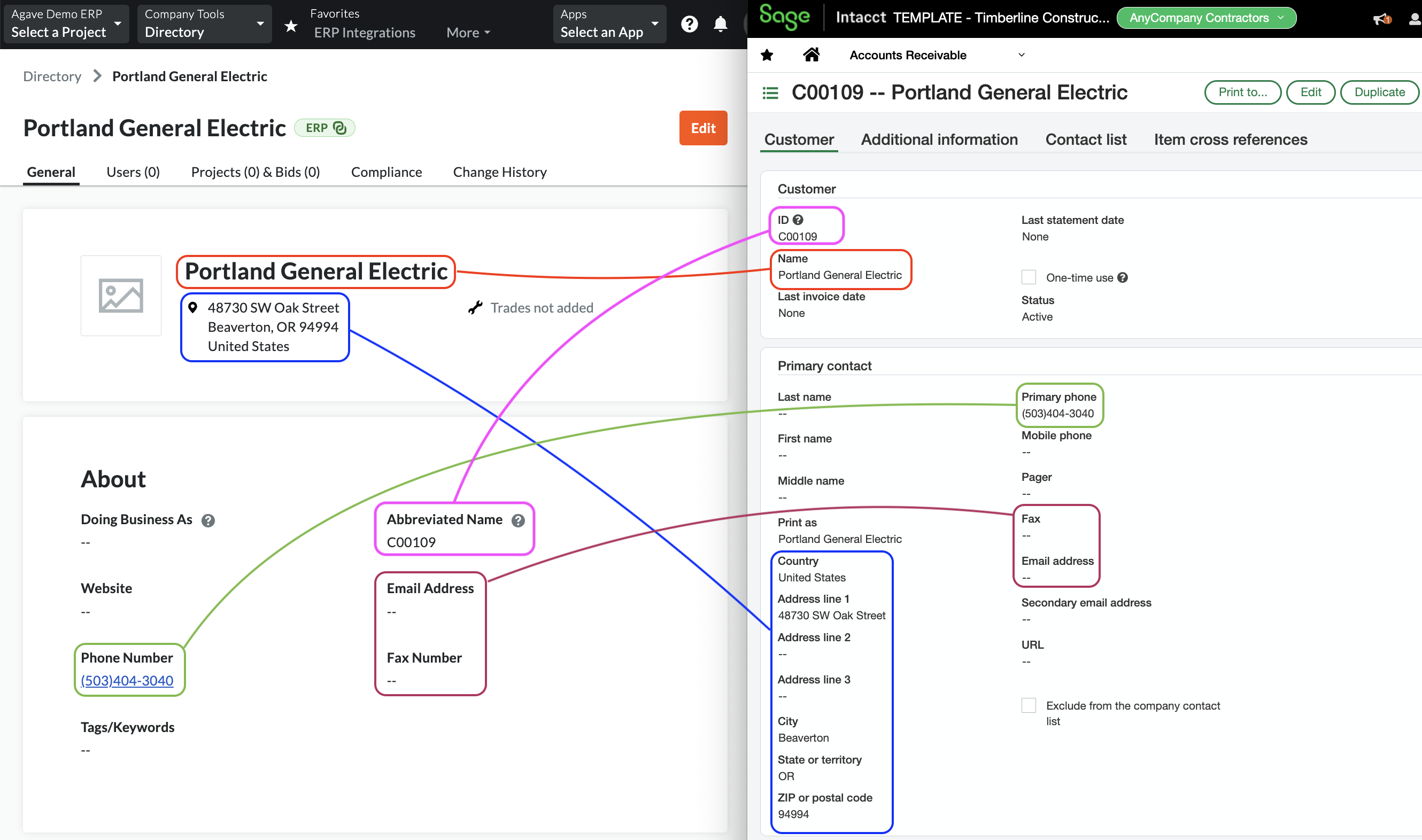
Common Errors and FAQs
Are there any pre-requisites to syncing Customers?
No. However, we recommend setting a filter beforehand to ensure only the Customers you plan to use in Procore are synced.
What fields does Agave Sync "Auto-link" on?
Agave Sync will auto-link on the following fields for Customers:
- Name
- Address
- Code/Number
- Phone
Can Agave Sync write custom fields to Procore Customers?
No - at the moment, this is a limitation with Procore where Procore does not allow for custom fields on “Company” records.
How do we differentiate between Vendors and Customers in Procore?
Procore does not have a way to differentiate between Vendors and Customers at the moment. However, Agave Sync can apply a suffix (e.g. of "(Customer)") to Customers to differentiate them if you would like.
Configuration in Sage Intacct
Default payment terms on Customers (recommended)
As a best practice, assign default payment terms to each Customer in Sage Intacct.
Sage Intacct requires a due date on every AR invoice. Setting default payment terms on the Customer ensures the due date auto-populates from the transaction date, preventing sync failures when a due date isn't provided from Procore.
To configure default payment terms on a Customer: Applications → Accounts Receivable → select a customer → Additional Information → Edit → Term.