Cost Projections
Visual Mapping
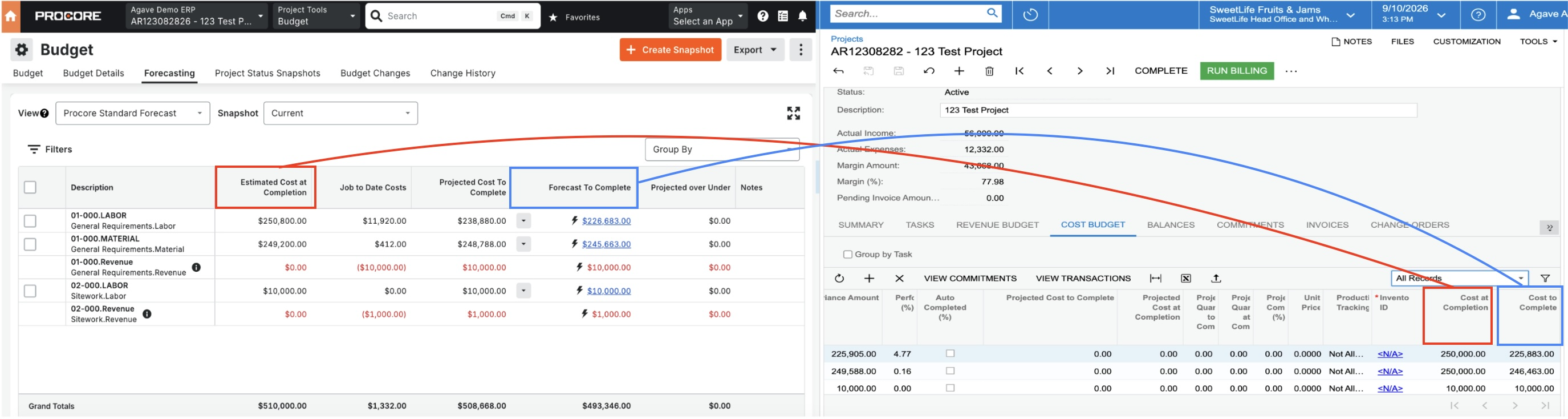
Demonstration
Configuration
Prerequisites
Agave syncs Procore Cost Projections → Acumatica Cost Budget lines.
In Acumatica, Cost Projections are not created as separate records. Instead, Agave updates the Cost at Completion and Cost to Complete fields on the corresponding Cost Budget line.
Before syncing Cost Projections, make sure the following records have already been synced:
- Projects
- Sub Jobs/Tasks
- Cost Codes
- Cost Types
- Budget Line Items
Agave uses the Project + Task + Cost Code + Cost Type to find the correct Acumatica Cost Budget line and update it with the Procore Cost Projection values.
If you do not use Sub Jobs in Procore, Agave can use your Default Project-Level Task in Acumatica. See Default Project-Level Task.
Acumatica must be on version 24.200 or later. Earlier versions do not expose the Cost at Completion or Cost to Complete fields on Project Budget lines.
Budget View
Cost at Completion is pulled from a column on the Procore project's Budget View, so the correct view needs to be identified before syncing.
The Agave team can configure this for you on the backend. We'll need to confirm which Procore Budget View your projects use. By default, Agave reads Estimated Cost at Completion from that view and writes it to Acumatica Cost at Completion. If your view uses a different column name for cost at completion, we can point the sync at that column instead.
Forecast To Complete is always written to Acumatica Cost to Complete. It is not an alternative to Estimated Cost at Completion.
The selected Budget View must also be assigned to the project in Procore.
Projection Date
On the Cost Projections page in Agave Sync, you can choose the date Agave uses when syncing projection values.
- Manual Posting Date — used when you manually select and sync Cost Projections. It defaults to today and applies only to that sync.
- Automatic Posting Date — used for scheduled auto-syncs. You can choose the last day of the previous month, first day of the current month, or last day of the current month.
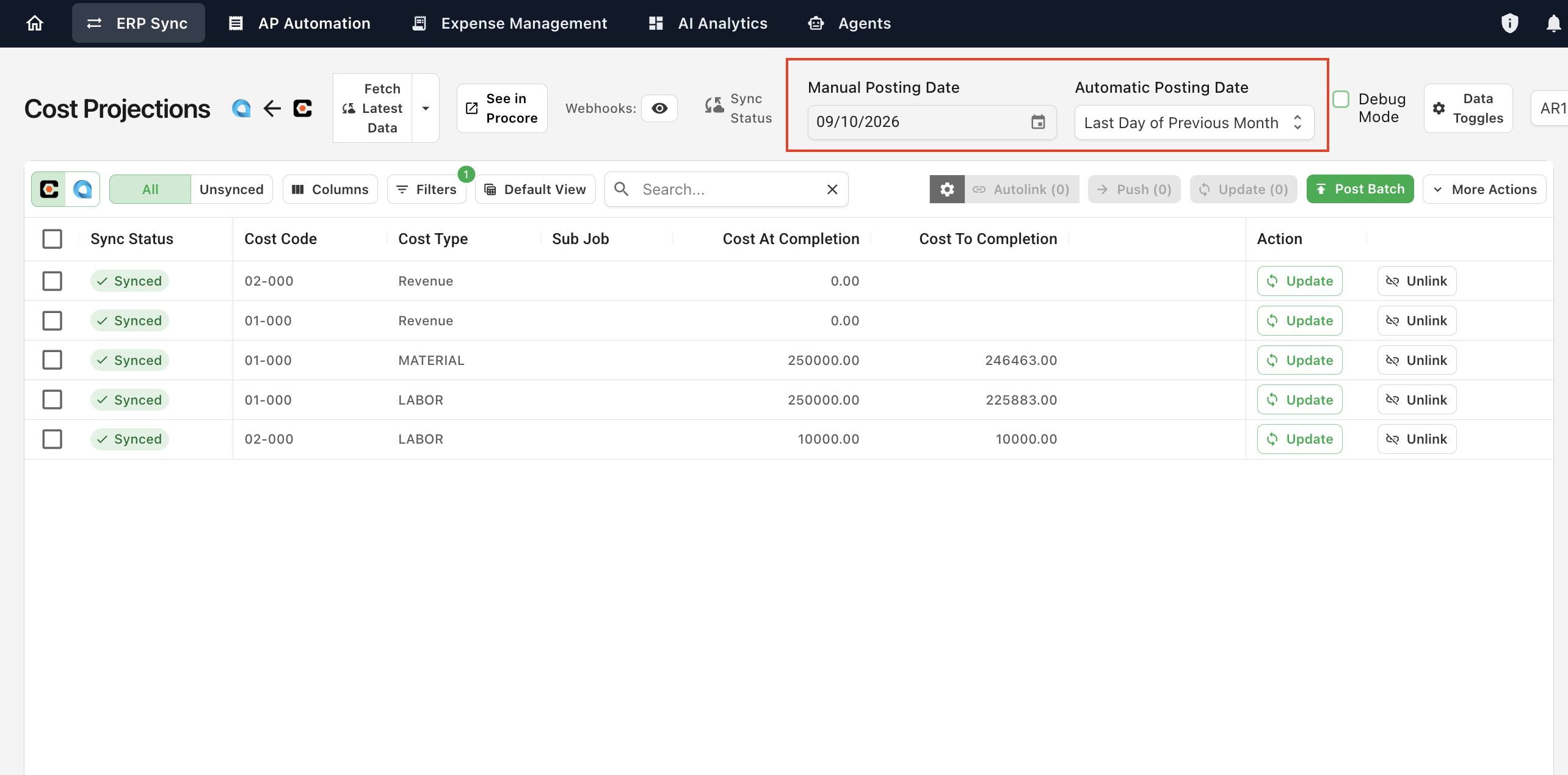
For daily or more frequent auto-syncs, Agave uses the current date instead.
This date is only used to timestamp the sync. It does not create a separate dated forecast record in Acumatica — the projection values still update the existing Cost Budget line.
FAQs
Can I delete Cost Projections from Acumatica in Agave?
No. Cost Projections update the underlying Acumatica Cost Budget line rather than creating a separate record. Because of this, deleting a Cost Projection would also delete the Cost Budget line and is not supported. To make a change, update the projection values in Procore and sync again.
Why don't I see every Budget Line Item as a Cost Projection in Acumatica?
Agave only displays Acumatica Cost Budget lines that already contain a Cost at Completion or Cost to Complete value. Budget lines that have not yet received projection values will not appear in the Cost Projections list.
How is this different from Acumatica's Cost Projections screen?
Acumatica has a separate Cost Projections screen (PM305000) that stores each projection as its own document. Agave's Cost Projections module does not write to that screen. It writes the Cost at Completion and Cost to Complete values directly onto the project's Cost Budget lines.
If your reporting depends on released Cost Projection documents in Acumatica, raise this with your Agave rep before configuring this module.
Do I have to use a Sub Job in Procore?
No. Every Acumatica Cost Budget line needs a Task, but Procore Sub Jobs are optional. If a Cost Projection has no Sub Job in Procore, Agave applies your Default Project-Level Task so it can still write Cost at Completion and Cost to Complete onto the matching Cost Budget line. See Default Project-Level Task.