Prime Change Orders
Visual Mapping
Header
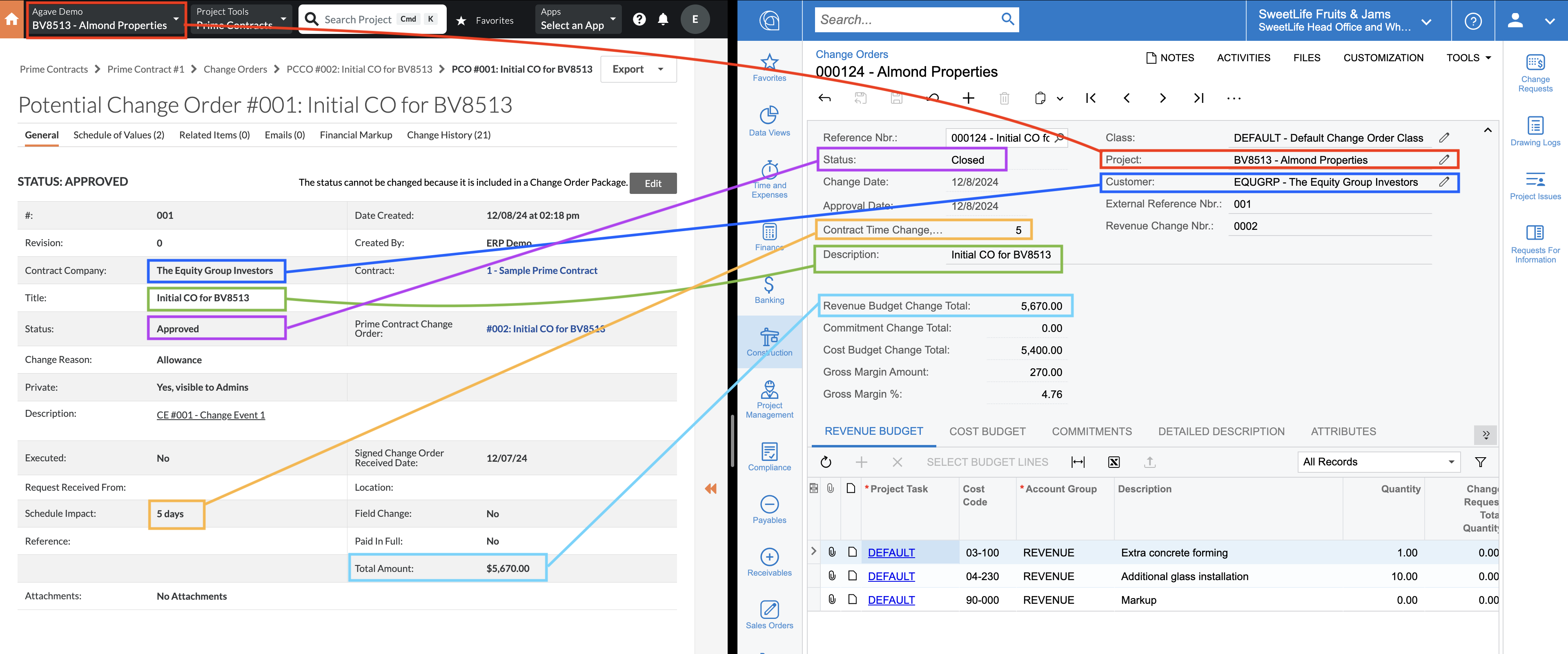
Status
By default, Change Orders will be marked as "Closed" in Acumatica.
Dates
Approval Date and Change Date will be set to the review date from Procore.
Revenue Lines
Agave brings the full marked up total (if you use the markup tool) from the Procore Prime Change Order into the Acumatica Revenue Budget:

Markup lines (e.g. line 3 in the above example) are added based on the Financial Markup budget code mapping in the "Financial Markups" section of the PCO:

A few nuances to note:
- All Cost Types will be transformed to the default revenue Acumatica Account Group
- Both horizontal and vertical markup is supported
- If your project Revenue Budget Level is set to "Task", Agave can aggregate revenue budget line items by Task. Work with your account rep to enable this setting.
- If you don't use the markup tool, you can designate a "Revenue" Cost Type that will be included on the Revenue Budget tab of the CO in Acumatica and not the Cost Budget.
Cost Lines
Agave creates line items in the Acumatica "Cost Budget" tab for each line item on the Procore PCO. Note that the amounts on these lines will be exclusive of markup:
