AR Payments
Visual Mapping
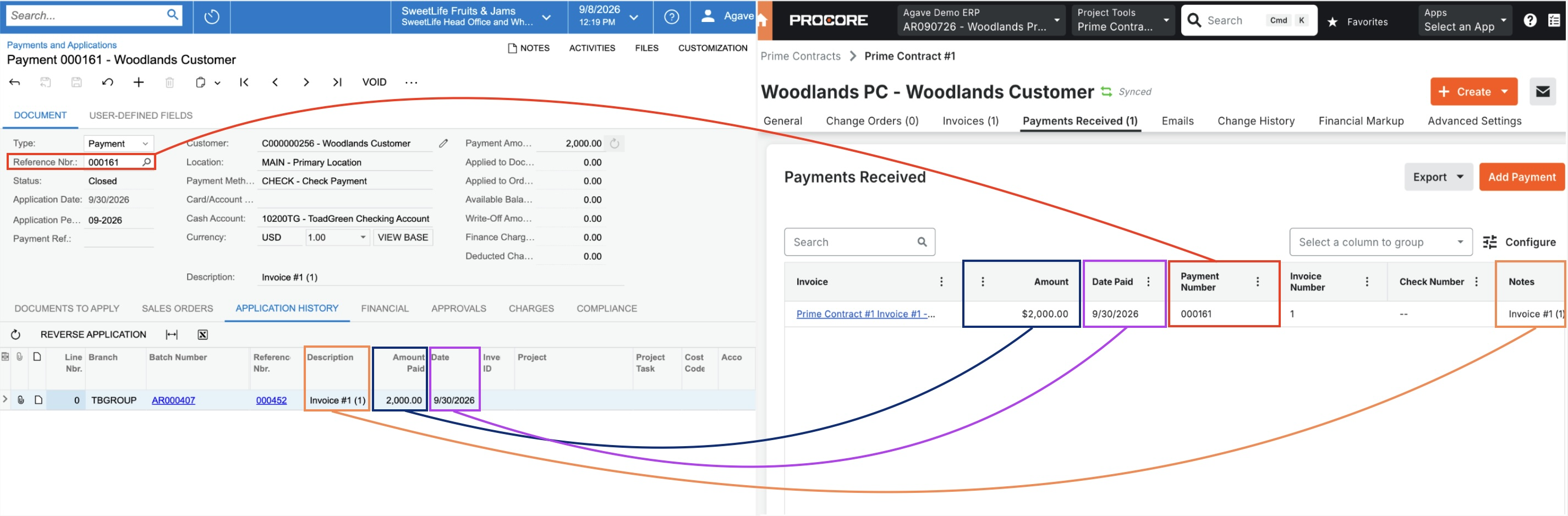
Demonstration
Configuration & FAQs
Customization Package Installation
Agave uses a customized Generic Inquiry to pull AR Payments from Acumatica. To enable this, install the latest Agave customization package in Acumatica using our self-serve setup guide. The latest package includes the required Generic Inquiries for AR Payments.
Prime Contract Status
Procore requires a Prime Contract to be in the "Approved" or "Complete" state before a payment can be recorded against it.
Payments Received Tab Not Visible
The Payments Received tab can be turned off on an individual Prime Contract. If the tab is missing in Procore, open the Prime Contract's Advanced Settings tab, scroll to the Payments Received section, and confirm the Enable Payments box is checked. Procore's default setting is on.