AR Payments
AR payments are the records of money customers pay you—for example, applying a check against an open invoice. This page explains how those payments can relate to QuickBooks Desktop and Procore when you use Agave Sync.
Visual mapping
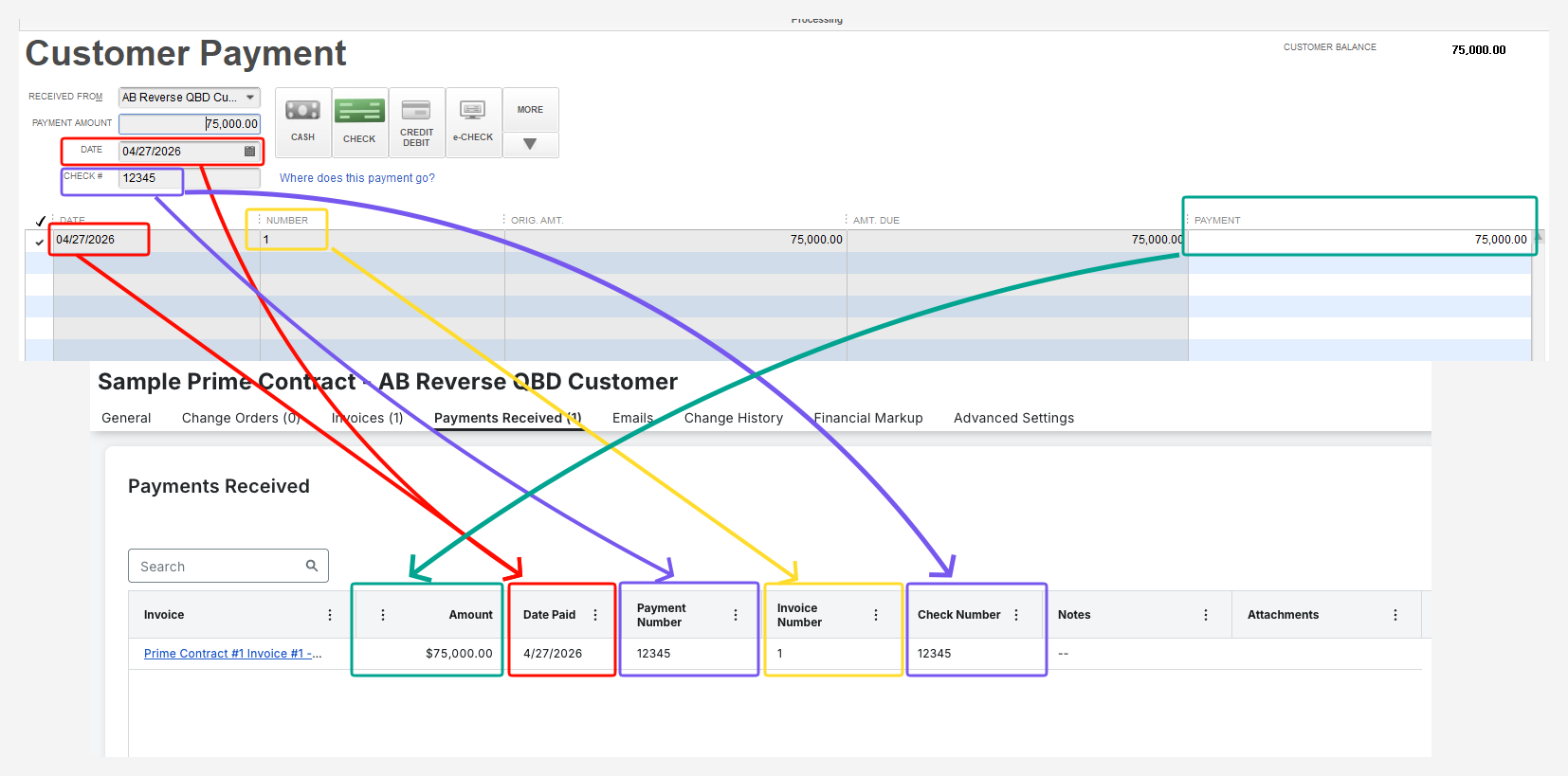
What is supported?
QuickBooks Desktop → Procore
Agave can apply logic so that a customer payment recorded in QuickBooks Desktop updates the related information in Procore—for example, tying the payment to the correct owner invoice and prime contract context, and passing through check number when the payment is a check.
Procore → QuickBooks Desktop (not supported)
Agave Sync does not push customer payment records from Procore into QuickBooks Desktop. If the payment must appear in your accounting file, it should be recorded in QuickBooks Desktop (or your usual bookkeeping process there).
Requirements
- The payment in QuickBooks should apply to one invoice in a straightforward way (splitting across many invoices in one payment is not supported).
- The QuickBooks invoice on the payment must already map to the correct Procore AR (owner) invoice so Procore knows which draw or invoice to update.