AP Payments
AP payments are the records of money you pay vendors—for example, paying a subcontractor’s bill by check or credit card. This page explains how those payments can move between QuickBooks Desktop and Procore when you use Agave Sync.
Visual mapping
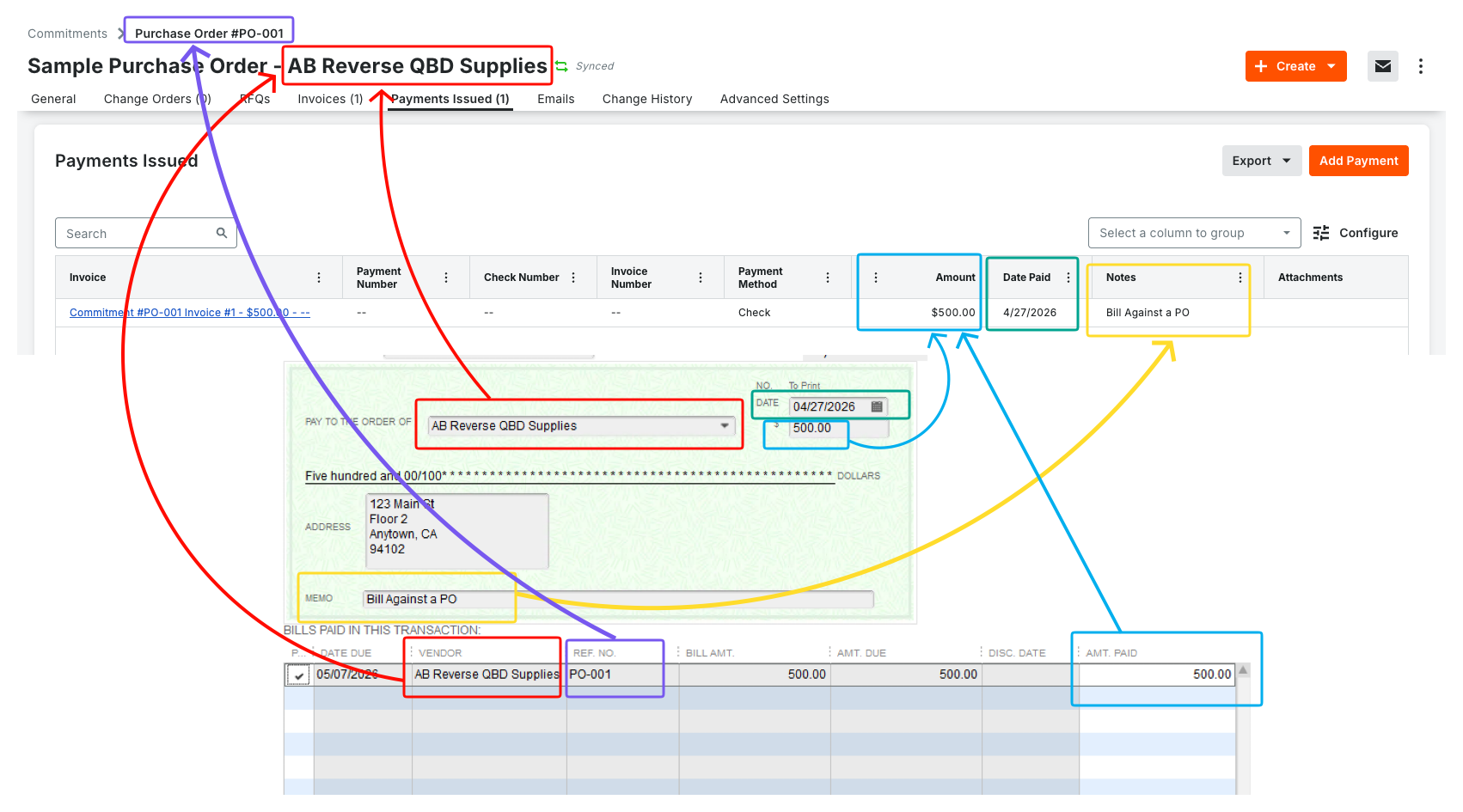
What is supported?
QuickBooks Desktop → Procore (supported)
When you record a vendor payment in QuickBooks Desktop against a bill, Agave can create or update the matching paid status in Procore on the right commitment (purchase order or subcontract), as long as the bill in QuickBooks is already linked to the correct Procore invoice.
By default, only payments made as check or credit card bill payments in QuickBooks are included. Other payment types are not part of the standard setup.
Procore → QuickBooks Desktop (not supported)
Agave Sync does not send vendor payment records from Procore into QuickBooks Desktop. If the payment should exist in your books, it should be entered (or completed) in QuickBooks Desktop.
Before payments can sync from QuickBooks to Procore
- The bill in QuickBooks that you are paying must already be tied to the correct Procore AP invoice on the correct contract.
- The payment in QuickBooks should apply to one bill only. If a single payment pays multiple bills at once, it will not follow this sync path.
- The payment method in QuickBooks should be check or credit card.
What gets reflected in Procore?
In general, the sync aims to mark the work as paid in Procore and to carry over details your team expects—such as payment method, the amount (including how discounts are handled on the QuickBooks side), and check number when the payment is a check.
Common questions
Why didn’t a payment sync from QuickBooks to Procore?
Typical causes include: the payment pays more than one bill, the bill is not mapped to a Procore invoice, the payment type is outside the default check/credit card setup, or the invoice/contract mapping needs to be corrected. Your Agave contact can help review logs and settings.