AP Payments
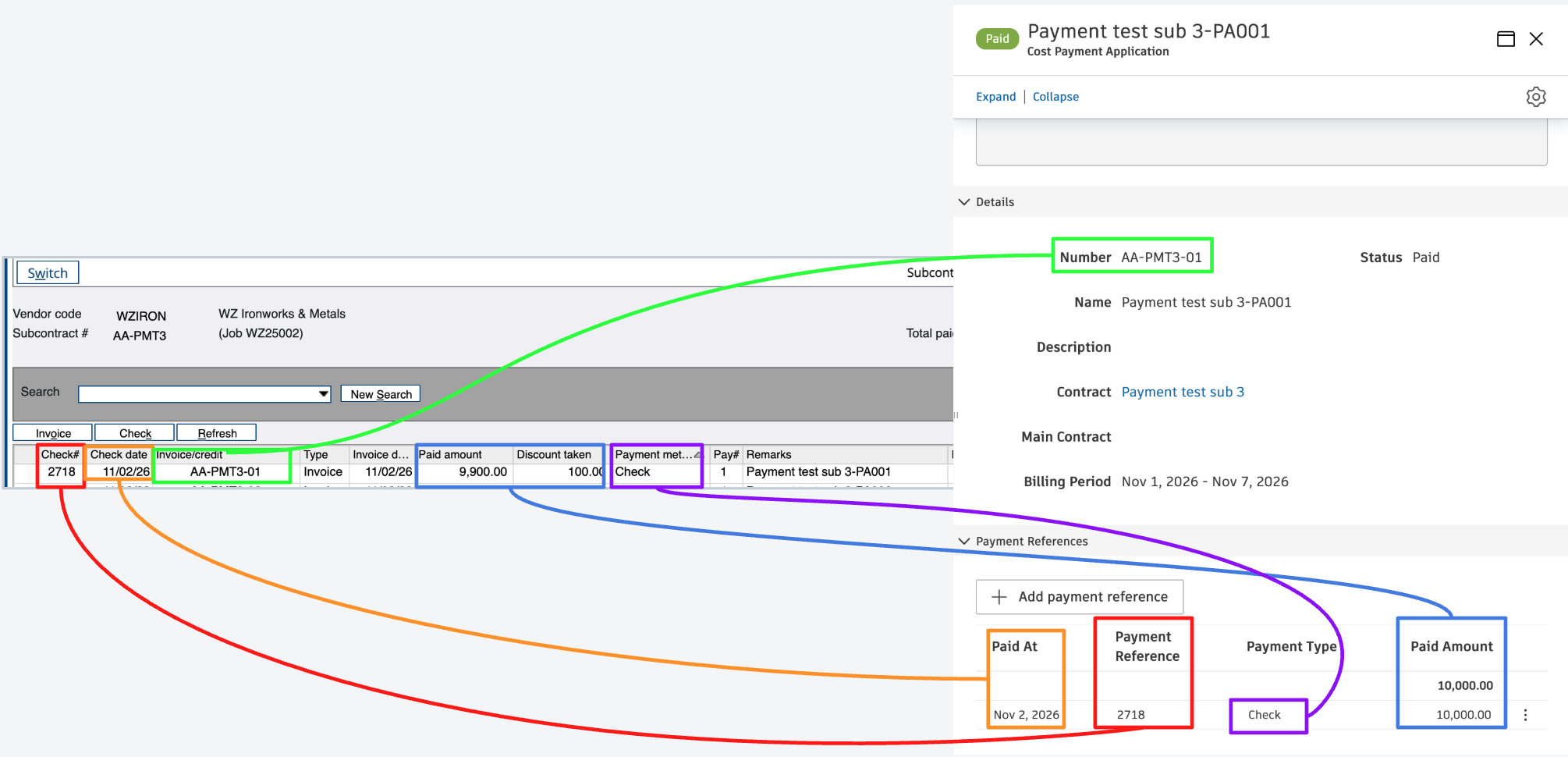
Agave ERP Sync allows you to sync Spectrum Vendor Payments to Autodesk Build Payment References on Cost Payment Applications.
Visual Mapping
Common Errors and FAQs
Are there any pre-requisites to syncing AP Payments?
Yes. A payment attaches to an existing Cost Payment Application in Autodesk Build, so the following must be synced beforehand:
- Vendors
- Projects
- Subcontracts
- AP Invoices (Cost Payment Applications)
Which Spectrum payments sync?
Only posted payments. A manual check syncs after you run the Manual Check Register update.
Does Agave update the AP Invoice status to be "Paid"?
Yes. Once the payments on a pay app cover its Current Payment Due, Autodesk Build marks the pay app as Paid.
Why is my payment showing Missing Dependency or not syncing?
This usually means the invoice the payment is applied to is not linked to Autodesk Build. Check that:
- The Subcontract is synced and linked
- The AP Invoice was synced from Autodesk Build, not entered in Spectrum
Payments on credit memos and on invoices entered directly in Spectrum will not sync, and Fetch Latest Data won't resolve them.
What happens when one check pays several invoices?
Agave creates one payment per invoice. A check covering three invoices shows as three payments in Autodesk Build, each with the same check number as its reference.
How are discounts handled?
The payment amount includes the discount taken in Spectrum. For example, a $10,000 invoice paid with a $9,900 check and a $100 discount syncs as a $10,000 payment, so the invoice shows as fully paid.
How are vendor credits handled?
Credit memos applied on a check do not sync. The invoice on the same check still syncs at its full amount. For example, a $4,000 check that pays a $5,000 invoice and applies a $1,000 credit syncs as a $5,000 payment.
How is retention handled?
Retention payments in Spectrum do not sync. Autodesk Build releases retention on a later pay app, so syncing the Spectrum retention payment against the original invoice would show it as overpaid.