Change Orders

Owner Change Orders

Agave syncs Owner Change Orders ("OCOs") in Autodesk Build to Change Requests with Billing Lines in Viewpoint Spectrum.

The status field mapping is flexible based on your preferences; work with your Agave rep to configure this.

Visual Mapping

For each OCO in Autodesk, one Change Request will be created in Spectrum with the header-level information transferred:

Autodesk Build and Spectrum Owner Change Order Visual Mapping

Autodesk Build and Spectrum Owner Change Order Visual Mapping

Line Items

Agave can create three line item types in the Spectrum Change Request from the Owner Change Order (Cost, Markup, and Billing). You can choose to designate a special cost code for Overhead/Profit (OH&P) in Autodesk that Agave will withhold from syncing as a cost.

Cost Lines

Each non-OH&P Budget Code (the first 5 in this example) on the Autodesk OCO are synced to the “Costs” tab in Spectrum:

Autodesk Build and Spectrum Owner Change Order Visual Mapping

Note that the “Take off total” in Spectrum is equal to the total Autodesk OCO total minus the OH&P lines.

Markup Lines

The OCO lines using the OH&P Cost Code in Autodesk are synced to the “Markups” tab in Spectrum, with the markup amount distributed by Cost Type.

Autodesk Build and Spectrum Owner Change Order Visual Mapping

Billing Lines

Optionally, Agave creates a line on the billing tab equal to the sum of all line items (both OH&P and non-OH&P):

Autodesk Build and Spectrum Owner Change Order Visual Mapping

Note that this matches the total on the Autodesk OCO. Agave can also create multiple billing items (one for each line item) if preferable.

Video Tutorial

Subcontract Change Orders

Agave syncs Subcontract Change Orders ("SCOs") in Autodesk Build to Change Requests with Cost Lines in Viewpoint Spectrum.

The status field mapping is flexible based on your preferences; work with your Agave rep to configure this.

note

Agave only supports syncing Change Orders against Subcontracts. Agave does not support syncing Change Orders against Purchase Orders.

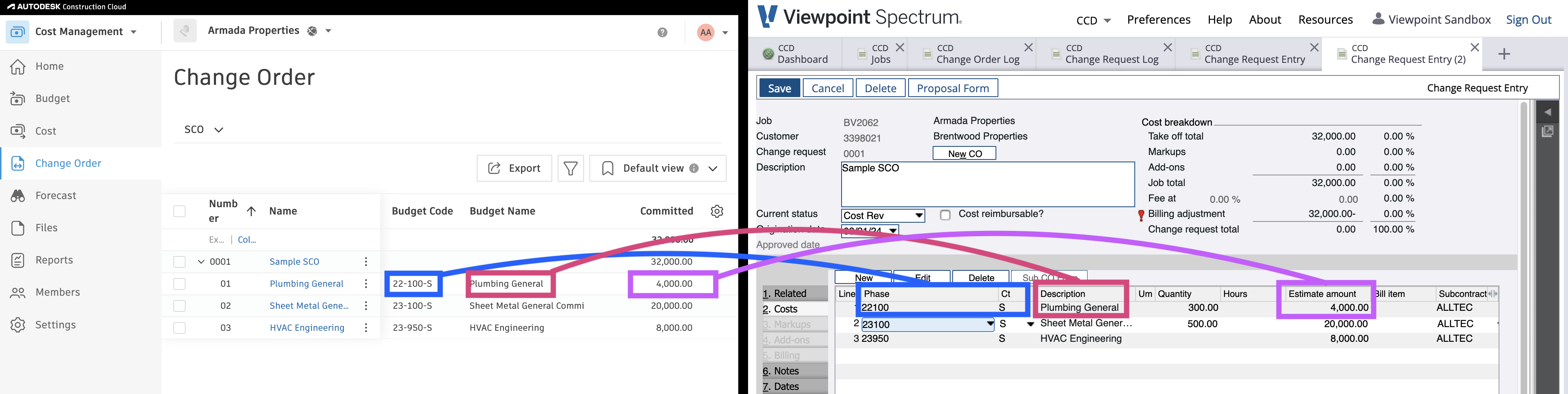
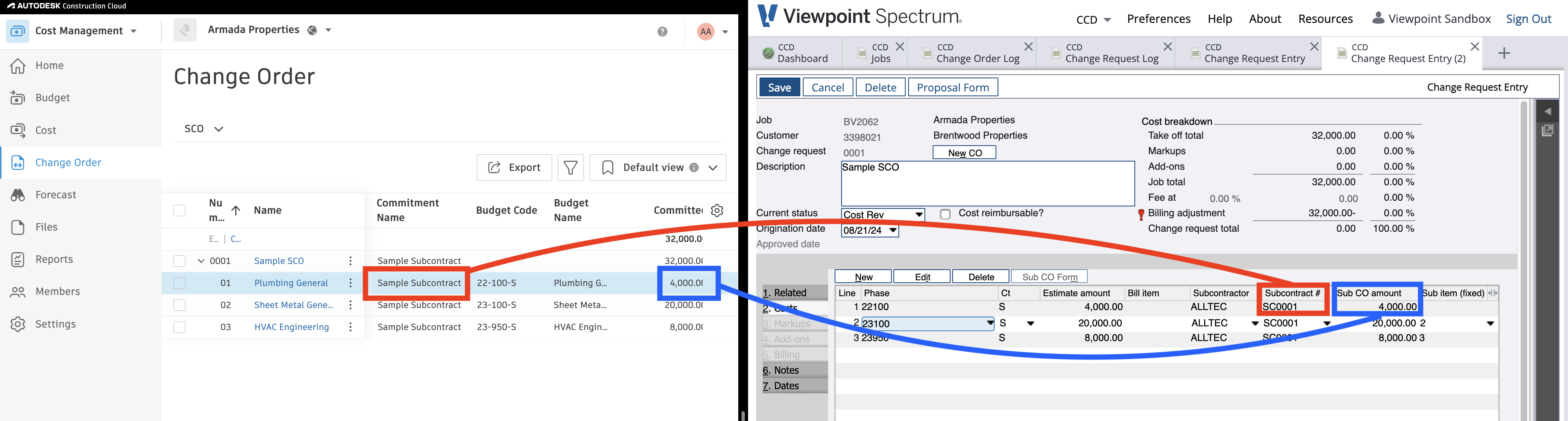
Visual Mappings
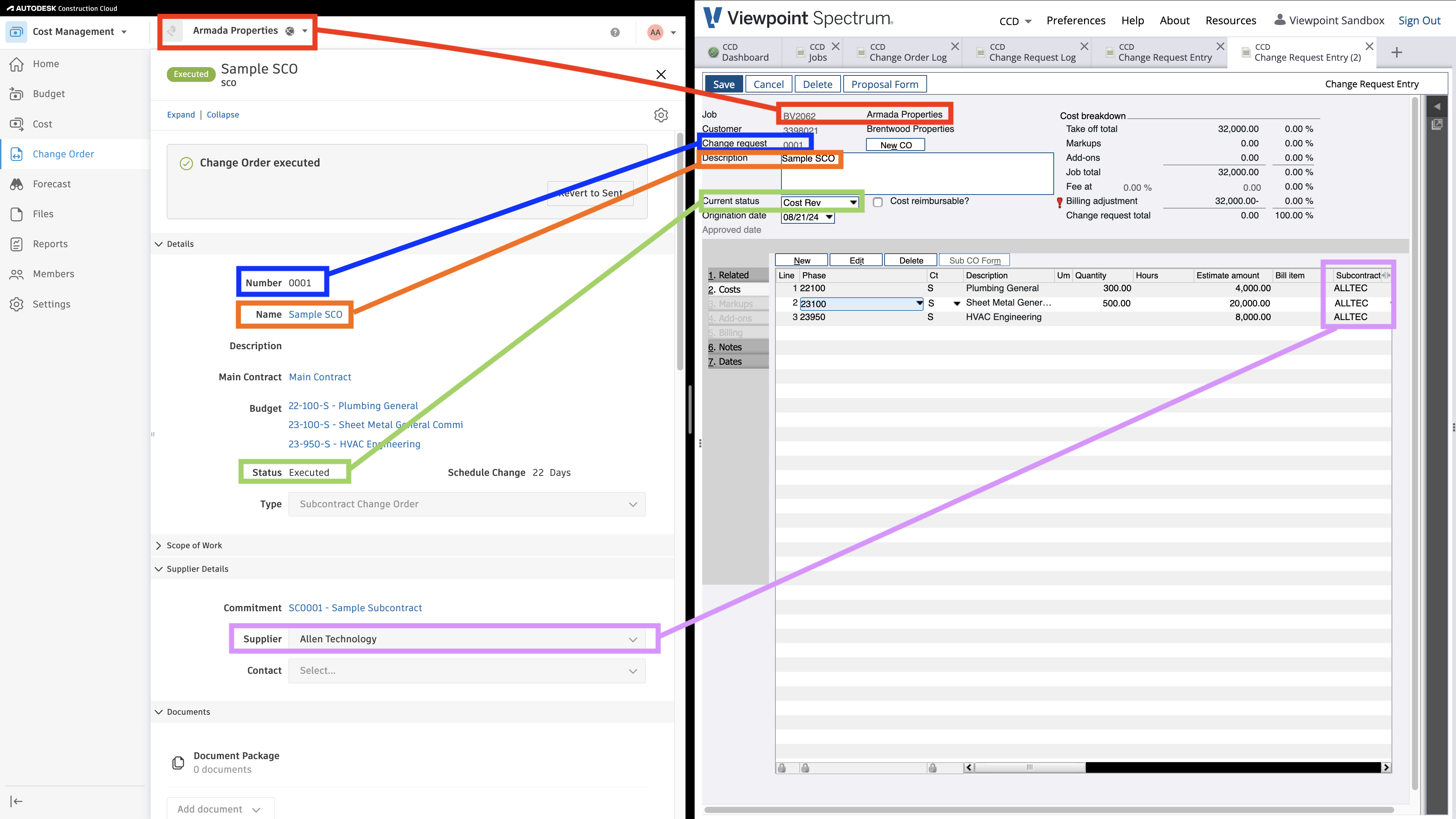
Autodesk Build and Spectrum Subcontract Change Order Visual Mapping

Autodesk Build and Spectrum Subcontract Change Order Visual Mapping

Autodesk Build and Spectrum Subcontract Change Order Visual Mapping

Video Tutorial

Common Errors and FAQs

Does Agave Support Syncing Sub-items from Autodesk Build?

Yes, Agave supports syncing one level of sub-items from Autodesk Build for the following record types:

  • Subcontracts
  • Purchase Orders
  • Change Orders
  • AP Invoices
  • Prime Contracts
  • Prime Contract Change Orders
  • AR Invoices

To enable syncing for sub-items, ask your Agave Account Manager to enable it for you.

How It Works

Autodesk Build records have a hierarchical structure with:

  • Root items — parent line items
  • Sub-items — child line items
  • Sub-sub items — which are explicitly filtered out (only one level of nesting is supported)

Agave Sync will include root items and their direct sub-items when syncing. Any items nested deeper than one-level are excluded.

The following Info-Link tables are required when syncing Change Orders from or to Spectrum:

  1. CR_CHNG_REQ_CON_DET_MC
  2. CR_CHNG_REQ_HDR_MC
  3. CR_CHNG_REQ_REV_MC
  4. CR_CHNG_REQ_STATUS_MC

For details on enabling Info-Link tables for your user, see Steps 2.7 in our Spectrum authentication guide.