Actual Production Quantities
Agave Sync allows you to sync Viewpoint Spectrum production quantities completed to date to Autodesk Build, where they appear as Tracked Output against a Performance Tracking Instance (the Budget Production Quantity) in the Forecast module.
Actual Production Quantities sync from Spectrum to Autodesk Build only.
Actual Production Quantities cover tracked output only (the quantity produced). The tracked input (hours worked) is handled separately by Timecard Entries. Each Actual Production Quantity sends the output quantity with an input quantity of 0, so it does not double-count labor hours.
Visual Mapping
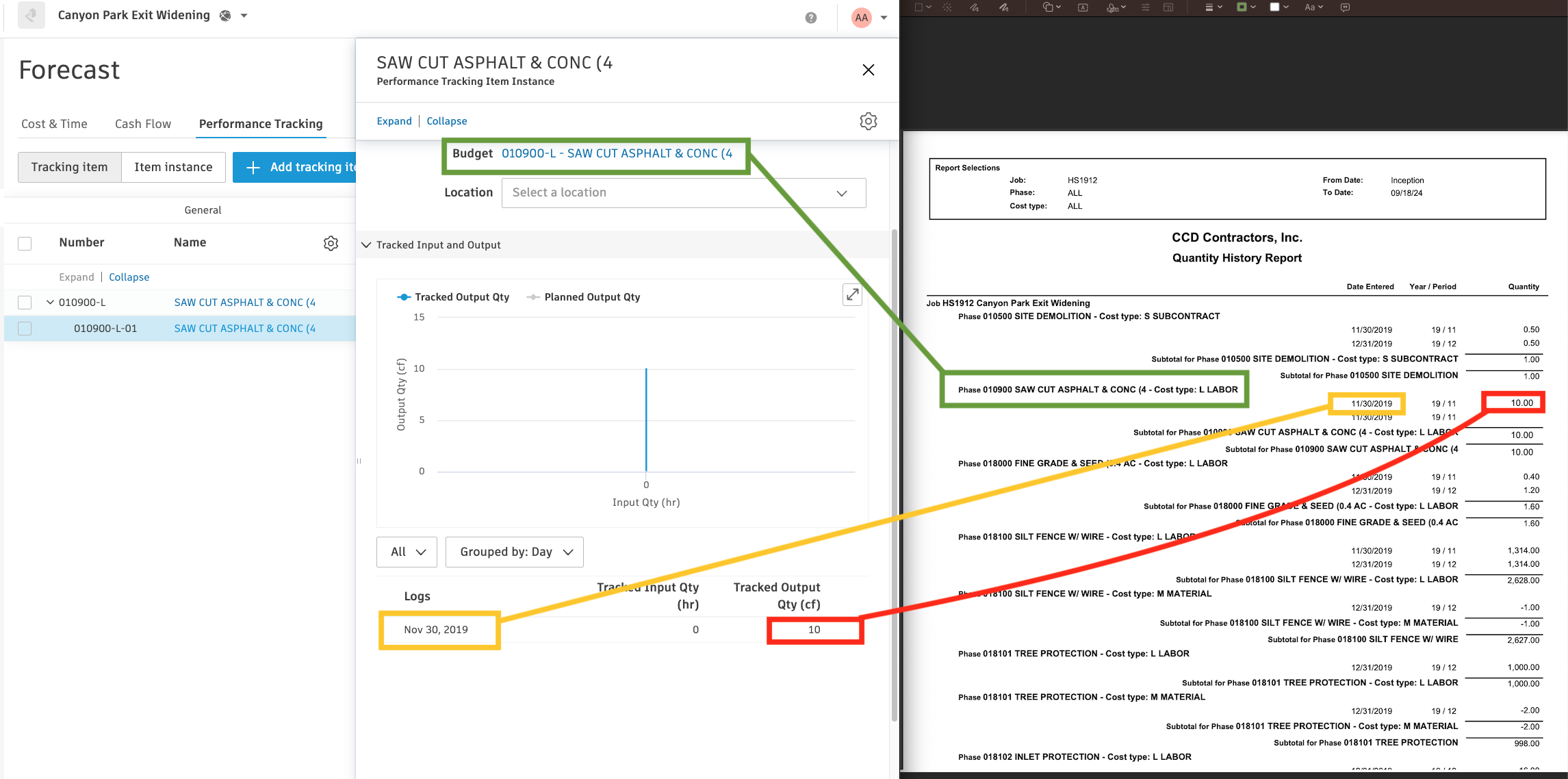
Importing Actual Production Quantities to Autodesk Build
Step 1: Confirm the Budget Production Quantity Exists in Autodesk Build
Actual Production Quantities are logged against an existing Budget Production Quantity (the Performance Tracking Instance) in Autodesk Build. Sync your Budget Production Quantities first - an Actual Production Quantity cannot be created if the matching Budget Production Quantity does not exist in Autodesk.
Step 2: Record Actual Production Quantities in Spectrum
In Spectrum, record the production quantities completed to date for the phase. Agave reads the quantity and its associated date.
Step 3: Sync Actual Production Quantities in Agave
- In Agave, go to the Actual Production Quantity module.
- Select your records and push them to Autodesk Build.
Agave matches each quantity to its Budget Production Quantity and logs the output against the corresponding Performance Tracking Instance.
Step 4: Confirm in Autodesk Build
- In Autodesk Build, open the project's Forecast module and select the Performance Tracking tab.
- The total tracked quantity for the budget code appears as the Tracked Output Qty.
- To see the individual entries, click the Performance Tracking Instance and review the Logs in the flyout.
Common Errors and FAQs
Are there any pre-requisites to syncing Actual Production Quantities?
Yes:
- The associated Project must be synced.
- The Budget Production Quantity must already exist in Autodesk Build (see Step 1). Because the Budget Production Quantity itself depends on a Budget Line Item with an Input Quantity, the full chain is: Budget Line Item → Budget Production Quantity → Actual Production Quantity.
How are tracked hours handled?
Actual Production Quantities only carry the output quantity produced. The hours worked (tracked input) come from Timecard Entries, which sync separately. Together they give Autodesk Build the input and output needed to calculate productivity.
What Info-Link Tables do I need?
The following Info-Link tables are required when syncing Actual Production Quantities to Spectrum:
- PR_TEMP_PRE_TC_QTY_ERROR_MC
- PR_PRE_TC_QTY_ENTRY_MC
- PR_PRE_TC_QTY_HISTORY_MC
- JC_QUANTITY_HISTORY_MC
- JC_PHASE_MASTER_MC
For details on enabling Info-Link tables for your user, see Steps 2.7 in our Spectrum authentication guide.