Customers
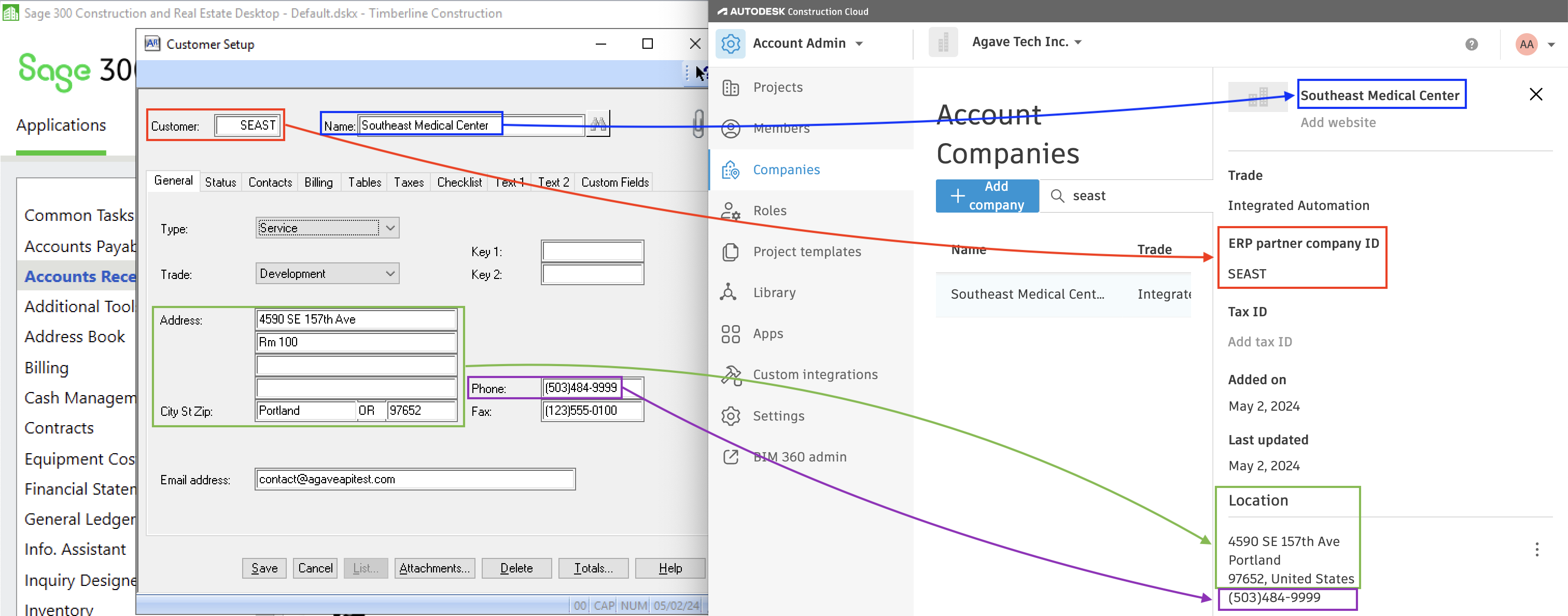
Agave Sync allows you to import Sage 300 CRE Customers to Autodesk Build Companies.
Visual Mapping
Common Errors and FAQs
Company Name Has Already Been Taken for Customer
If you encounter the error [Autodesk Build Error] 1002: The company name has already been taken, it indicates that a Customer and/or Vendor with the same name already exists in Autodesk Build.
How to Fix the Error
- Link the Record: link the Customer or Vendor to the existing Company in Autodesk Build.
- Check for Duplicates: if you cannot link the Customer or Vendor, it means there is a duplicate entry in your accounting system. In this case, you can:
- Delete or consolidate the duplicate Customer or Vendor in your accounting system,
- Ignore the duplicate record, or
- Update the name of the duplicate Customer or Vendor to make it unique.
What if the Customer has the same name as a Vendor in my ERP?
This error may occur if your ERP system contains both a Vendor and a Customer with the same name — representing two separate records for the same Autodesk Company.
To allow both records to sync, you must slightly differentiate the names in your ERP system.
For example, if both the Customer and Vendor are named "AnyTown Contractor," update one record to a variation like "AnyTown Contractor LLC" or "AnyTown Contractor (Customer)."
Invalid State Code for Country
When syncing Projects, Vendors, or Customers in Autodesk Build, only valid state or province names and ISO 3166-1 alpha-2 country codes are supported. Additionally, the specified state or province must correspond to a valid location within the project's country.
United States
Below is a list of valid state codes for use in Autodesk Build:
- AL: Alabama
- AK: Alaska
- AZ: Arizona
- AR: Arkansas
- CA: California
- CO: Colorado
- CT: Connecticut
- DE: Delaware
- FL: Florida
- GA: Georgia
- HI: Hawaii
- ID: Idaho
- IL: Illinois
- IN: Indiana
- IA: Iowa
- KS: Kansas
- KY: Kentucky
- LA: Louisiana
- ME: Maine
- MD: Maryland
- MA: Massachusetts
- MI: Michigan
- MN: Minnesota
- MS: Mississippi
- MO: Missouri
- MT: Montana
- NE: Nebraska
- NV: Nevada
- NH: New Hampshire
- NJ: New Jersey
- NM: New Mexico
- NY: New York
- NC: North Carolina
- ND: North Dakota
- OH: Ohio
- OK: Oklahoma
- OR: Oregon
- PA: Pennsylvania
- RI: Rhode Island
- SC: South Carolina
- SD: South Dakota
- TN: Tennessee
- TX: Texas
- UT: Utah
- VT: Vermont
- VA: Virginia
- WA: Washington
- WV: West Virginia
- WI: Wisconsin
- WY: Wyoming
Canada
Below is a list of valid province codes for use in Autodesk Build:
- AB: Alberta
- BC: British Columbia
- MB: Manitoba
- NB: New Brunswick
- NL: Newfoundland and Labrador
- NS: Nova Scotia
- ON: Ontario
- PE: Prince Edward Island
- QC: Quebec
- SK: Saskatchewan
- NT: Northwest Territories
- NU: Nunavut
- YT: Yukon
How does Autodesk Build treat vendors and customers from Sage 300 CRE?
Autodesk Build stores both in the same Companies module. To distinguish them, the sync writes (vendor) or (customer) in the ERP Partner Company ID so the type stays visible even though the list is combined.
Can a single Autodesk Build company be both a vendor and a customer linked to separate Sage records?
No. The sync expects a 1:1 relationship between a Sage record and an Autodesk Build company. If the same real-world company exists as both a Sage vendor and customer, add a tag or naming cue in Sage (e.g., "Vendor – XYZ", "Customer – XYZ") so the names remain unique when pushed.
What happens if Sage has two vendors with the same name but different IDs?
Autodesk Build requires unique company names. The second record will fail with an error like "company name has already been taken." Update the name in Sage (or carefully use a value map) so each company name is distinct, then push again.
Can we sync vendor or customer contacts/members between Sage and Autodesk Build?
Not today. Contacts and members do not sync; manage them separately in each system.
How do we exclude certain vendors from being synced to Autodesk Build (e.g., employees, one-off vendors)?
Use filters on vendor attributes (such as default ledger account or last invoice date) to scope which vendors are in view, or select specific vendors and choose Ignore so they stay out of sync until you explicitly unignore them.
What if we accidentally ignore a vendor or customer?
Filter by Is ignored = true, select the record, and choose Unignore to return it to the active sync list.
What are common errors when syncing vendors/customers and how do we fix them?
- Duplicate matches in Autodesk Build: Clean up duplicates in Autodesk Build or Sage so only one clear record exists, then re-run auto-link.
- Company name already taken: Adjust the name in Sage to make it unique, then push again.
- Invalid state/country codes: Normalize addresses in Sage to valid state and country values.
- Character limits: Extremely long fields (for example, names over 256 characters) may be truncated or error; shorten in Sage and re-sync.
Can we delete vendors or customers via the sync tool?
No. In Autodesk Build you typically deactivate rather than delete. Deactivate directly in Autodesk Build; the sync UI does not delete vendor/customer records.
How can we do a one-time cleanup of very old or inactive vendors before syncing?
Filter on Last invoice date or Last updated date to exclude older or inactive vendors. Sync only the filtered list, or mark the rest as ignored.