Budget Line Items
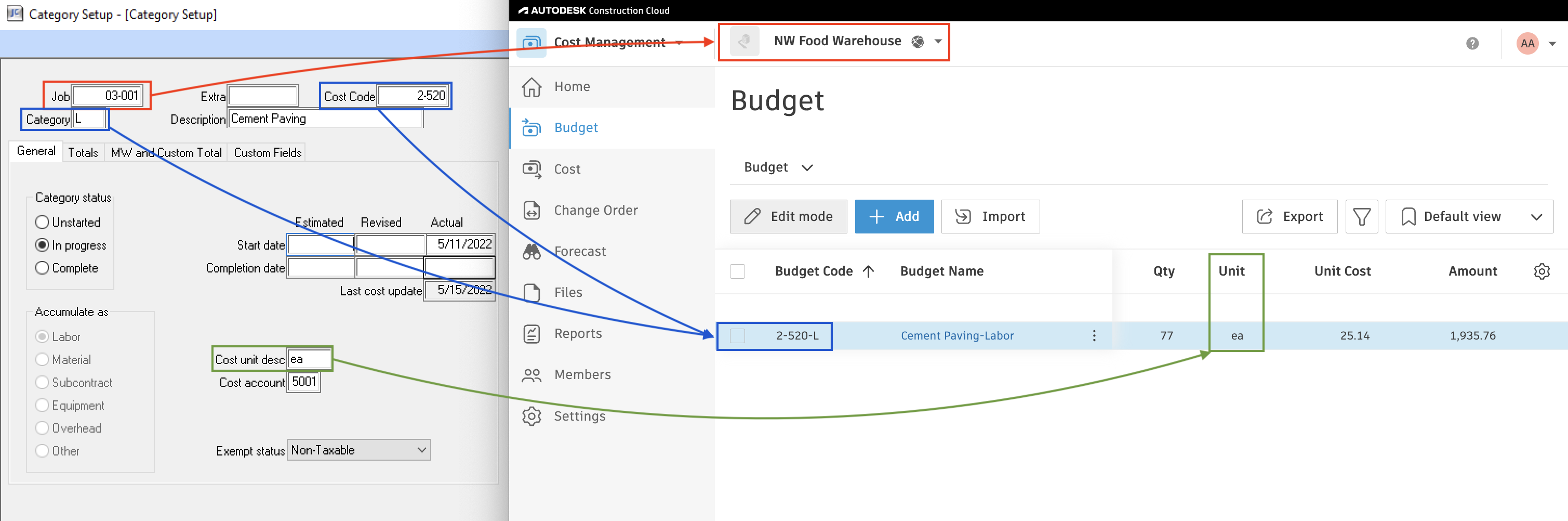
Agave Sync allows you to import Sage 300 CRE Estimates to and from Autodesk Build Budgets.
Visual Mapping
Filters
Sage 300 CRE automatically creates $0 Budget Line Items for every Category that can be associated with a Cost Code, even though you might only add a Budget Line Item for one Cost Code/Category match.
Let your Agave Account Manager know if you would like to apply a filter of >$0 for syncing Budget Line Items.
Posting
When syncing Budget Line Items from Autodesk Build to Sage 300 CRE, you can post them manually, or your Agave implementation rep can enable a setting that auto-posts budgets in Sage 300 after syncing.
What happens if auto-posting fails in Sage 300?
Check the Sage posting report — it will contain the reason the budget line items did not post.
Here is a video walking through the manual posting step: