Common Errors and FAQs
Sage 100 Contractor Database Errors
Syncs failing after Sage 100 Contractor software update with "database needs to be updated" error
If you recently updated your Sage 100 Contractor software and syncs start failing with an error stating that the database needs to be updated through Database Administration, even though all databases appear to be updated, try restarting the Sage Server.
This has resolved the issue for most customers experiencing this problem after a Sage 100 Contractor version update.
Steps to resolve:
- Restart the Sage Server
- Wait a few minutes for the server to fully restart
- Retry the sync
If the issue persists after restarting the server, please contact Agave support.
Sage 100 Contractor Database Query Time Out
This is a temporary error. Please wait a few moments and try again.
If it keeps happening, your Agave Connector might be out of date — check your version and follow the steps here.
What versions of Sage 100 Contractor do you support?
Agave supports Sage 100 Contractor versions 20.5 and above. Note, Agave's AP Payments endpoints only work with versions 25.2 and above.
What versions of Windows do you support?
We support the following versions of Windows:
- Windows 10
- Windows 11
- Windows Server 2016
- Windows Server 2019
- Windows Server 2022
Agave follows Microsoft's Product Lifecycle policy for Windows.
As of October 2023, Windows 8.1 and Windows Server 2012 have reached end of support and do not receive security updates. If you are using either version, we recommend upgrading immediately. Agave does not support these versions of Windows.
For more information, see related Microsoft announcement.
Agave Connector
Do I have to keep the Agave Connector running?
Yes. The Agave Connector needs to stay open to enable real-time data syncing.
How often does Agave sync my data?
Agave will attempt to sync your data every 15 seconds. Note, syncing can take longer depending on the amount of data being synced.
Do I need to disable my firewall?
No. You do not need to disable your firewall when using the Agave Connector.
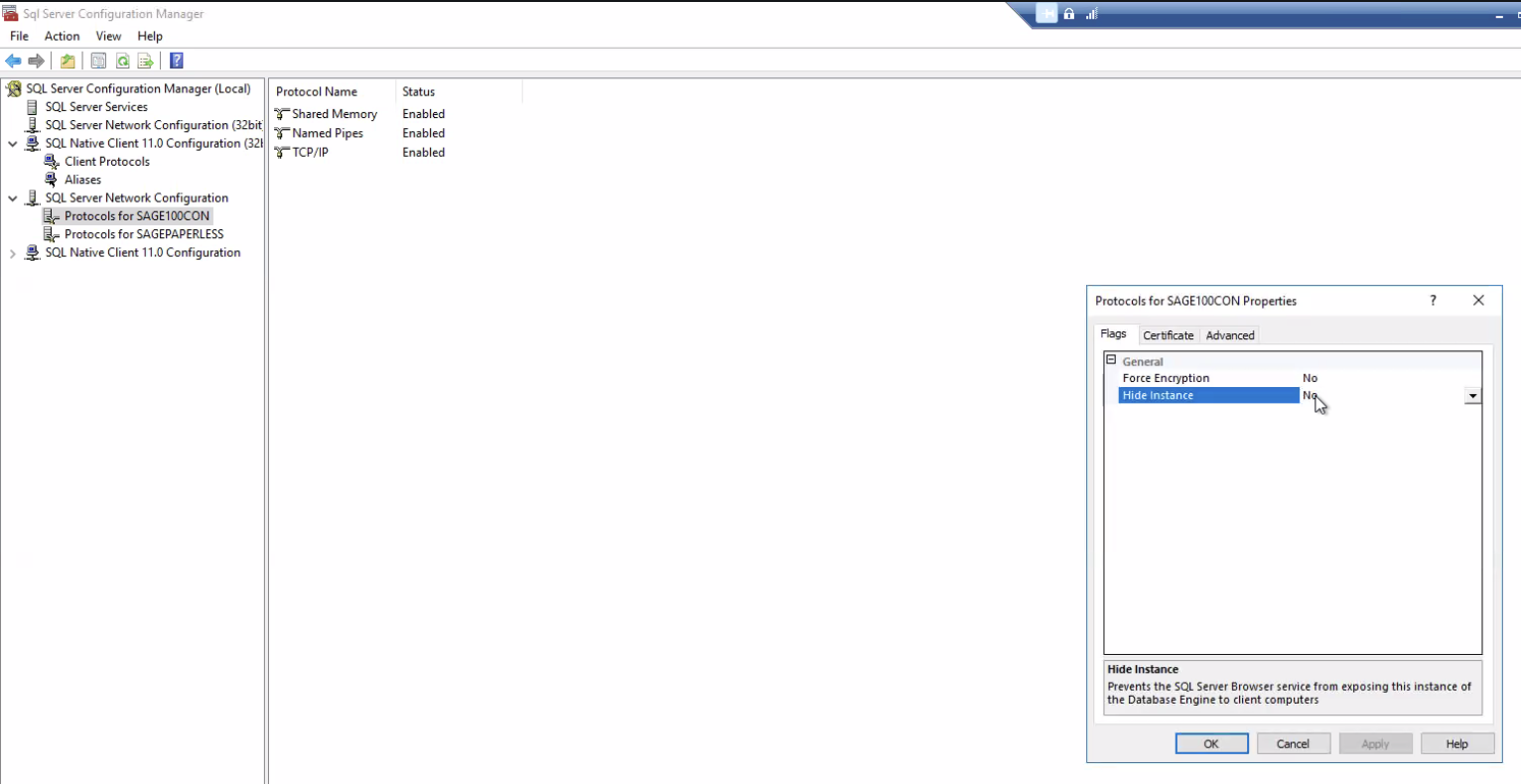
Faild to connect in 15000ms
If you see the error message "Faild to connect to XXX in 15000ms", and you've checked that you are using the correct host and instance name, check the "Sql Server Configuration Manager" and make sure the Sage instance isn't hidden there:
Task Scheduler Issues
Connection missing after changing the task's user account
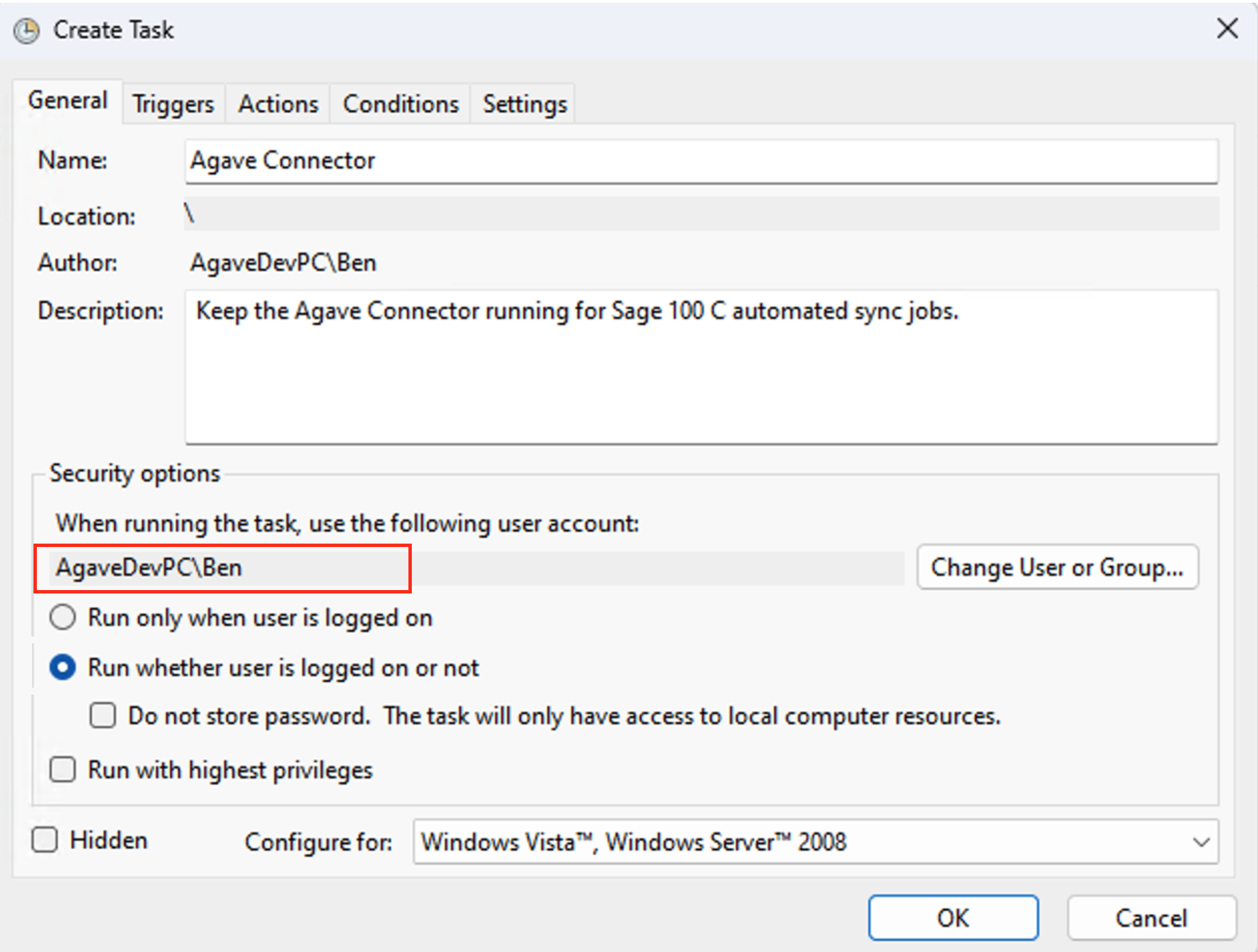
The Agave Connector's connection is tied to the Windows user profile it was configured under. If the scheduled task is set to run as a different Windows user than the one that originally set up the connection (for example, switching from a global admin account to a dedicated local admin account), the connector will launch unconfigured for that user and the previously created connection will not appear.
The user account under "When running the task, use the following user account" in the task's Security options (highlighted below) must be the same Windows user the connection was configured under.
If you run the connector under a new user and the connection is missing, the connection must be re-established under that user:
- Delete (or end) the existing scheduled task that was created under the old user account.
- Log in to the machine as the Windows user the scheduled task will run under, and open the Agave Connector under that account.
- Contact your Agave Implementation Manager for a new Account ID and Token, enter them in the Agave Connector, and click Test Connection. Once confirmed, let your Agave Implementation Manager know so they can verify the connection.
- Recreate the scheduled task following the steps in Windows Task Scheduler, making sure the task's user account (set via Change User or Group in the "General" tab) matches the Windows user the connection was configured under.
Whenever the scheduled task's "run as" user changes, the connection must be reconnected under that same Windows account. The existing connection will not carry over to the new user.
Labor Costs and Payroll
How do labor costs and hours flow from Sage 100 Contractor Payroll into Autodesk Build?
Labor costs flow from Sage 100 Contractor to Autodesk Build through the following process:
- Source in Sage 100 Contractor: When you complete 5-2-3 Compute Payroll in Sage 100 Contractor, it automatically creates 6-3 Job Cost records
- Sync to Autodesk Build: These 6-3 Job Cost records are read by Agave Sync and synced to Autodesk Build as Expenses
- Visibility in ACC Budget: Labor costs show up in the Autodesk Build Budget as summarized amounts against the specific cost codes
What is the source record for labor hours in Sage 100 Contractor?
The source records are the 6-3 Job Cost records that are automatically created when you run 5-2-3 Compute Payroll in Sage 100 Contractor.
At what point in the payroll process do labor costs become visible in Autodesk?
Labor costs become visible in Autodesk Build after:
- Payroll is computed in Sage 100 Contractor (5-2-3 Compute Payroll)
- The resulting 6-3 Job Cost records are created
- The sync runs and pushes these Job Cost records to Autodesk Build as Expenses
Are labor hours transferred as summary totals or transaction-level detail?
Labor costs are synced as summarized amounts against specific cost codes in the Autodesk Build Budget. The detail comes from the 6-3 Job Cost records in Sage 100 Contractor.