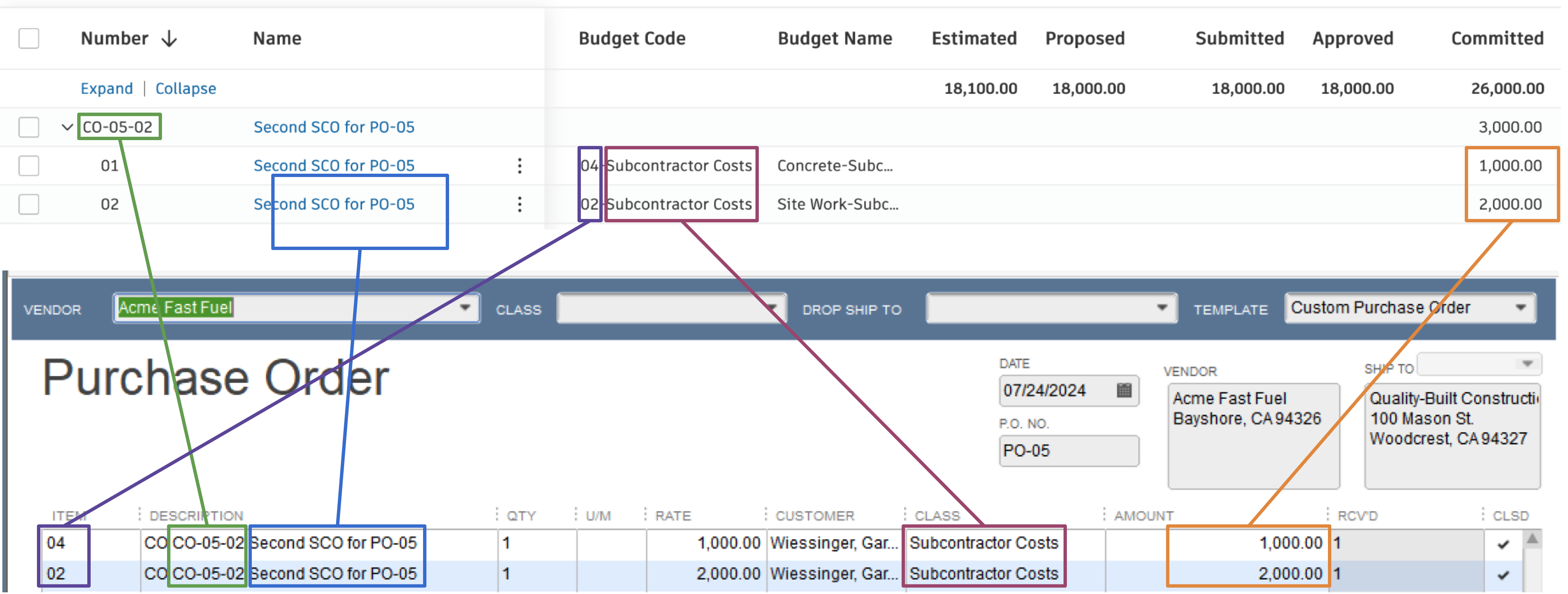
Change Orders
Visual Mapping
Change Orders can only be synced from Autodesk to QuickBooks Desktop. The reverse sync direction is currently not supported yet.
Each line item on the Subcontract Change Order synced from Autodesk will add a line item on the Purchase Order in QuickBooks Desktop.
Video Tutorial
Common Errors and FAQs
Does Agave Support Syncing Sub-items from Autodesk Build?
Yes, Agave supports syncing one level of sub-items from Autodesk Build for the following record types:
- Subcontracts
- Purchase Orders
- Change Orders
- AP Invoices
- Prime Contracts
- Prime Contract Change Orders
- AR Invoices
To enable syncing for sub-items, ask your Agave Account Manager to enable it for you.
How It Works
Autodesk Build records have a hierarchical structure with:
- Root items — parent line items
- Sub-items — child line items
- Sub-sub items — which are explicitly filtered out (only one level of nesting is supported)
Agave Sync will include root items and their direct sub-items when syncing. Any items nested deeper than one-level are excluded.
Can I change the prefix to the Change Order line items?
By default, a prefix "CO" is added to the line item when syncing over to QuickBooks Desktop. If you would like to change this prefix, let your Agave implementation manager know so they can configure this for you.
Note that if you change this prefix after syncing some Change Orders, Agave will no longer recognize the Change Orders that were already synced using the old prefix.