Prime Contract Change Orders (Owner Change Orders)
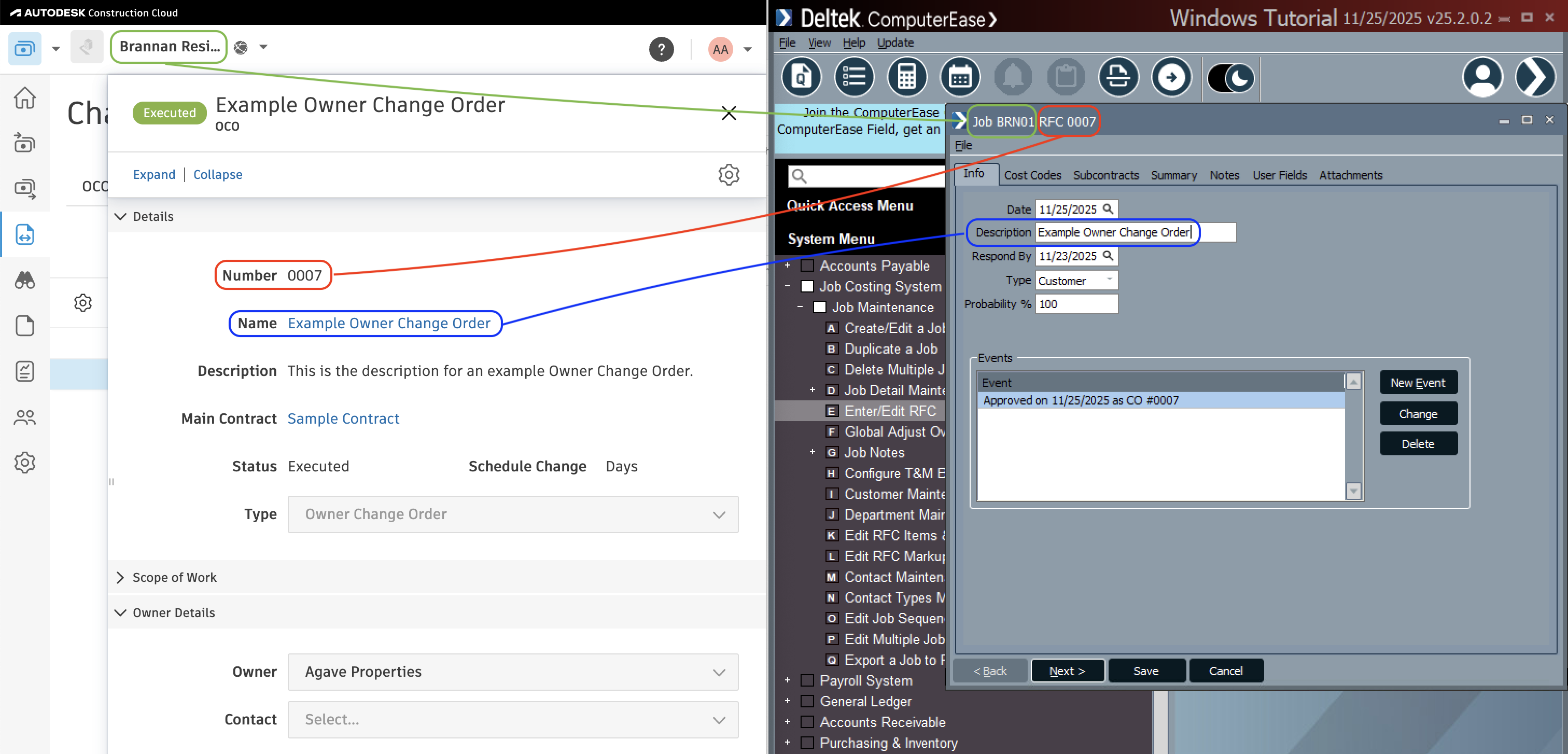
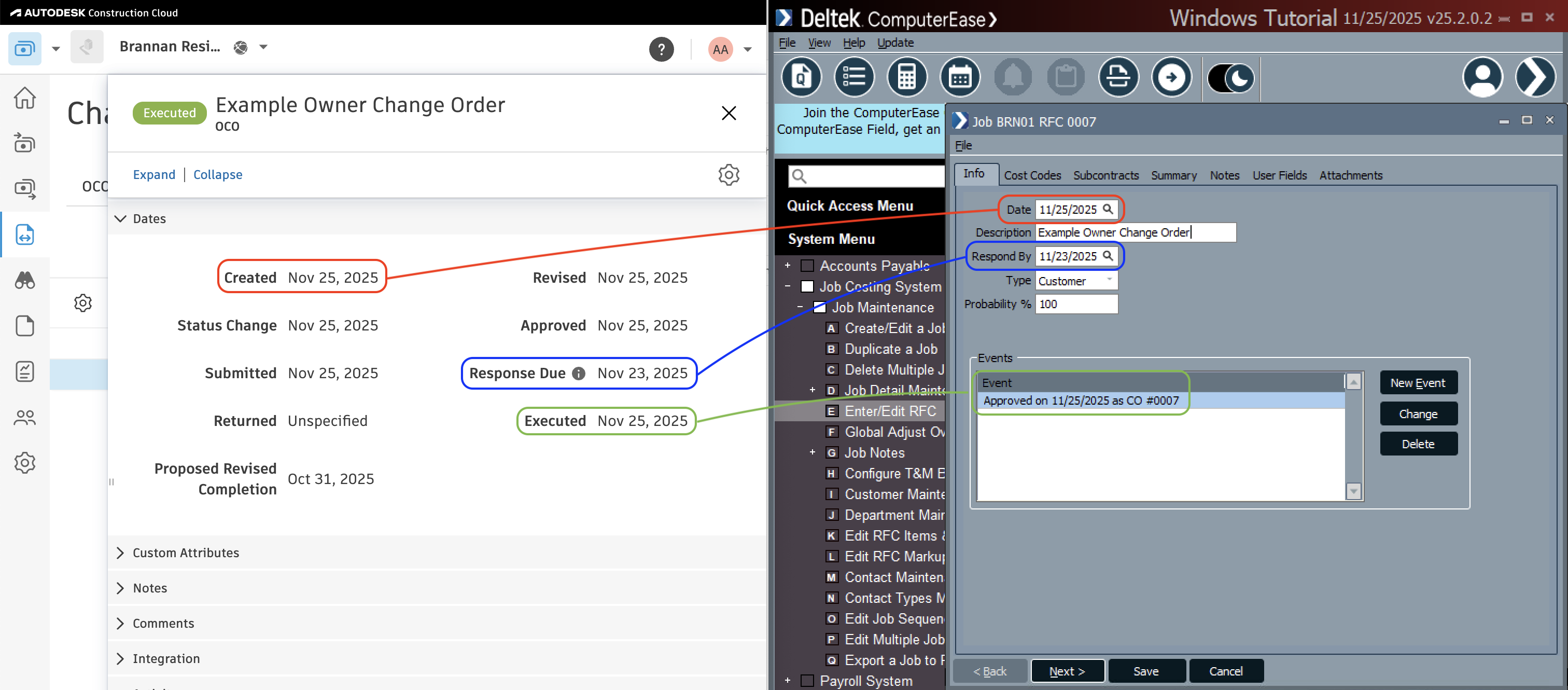
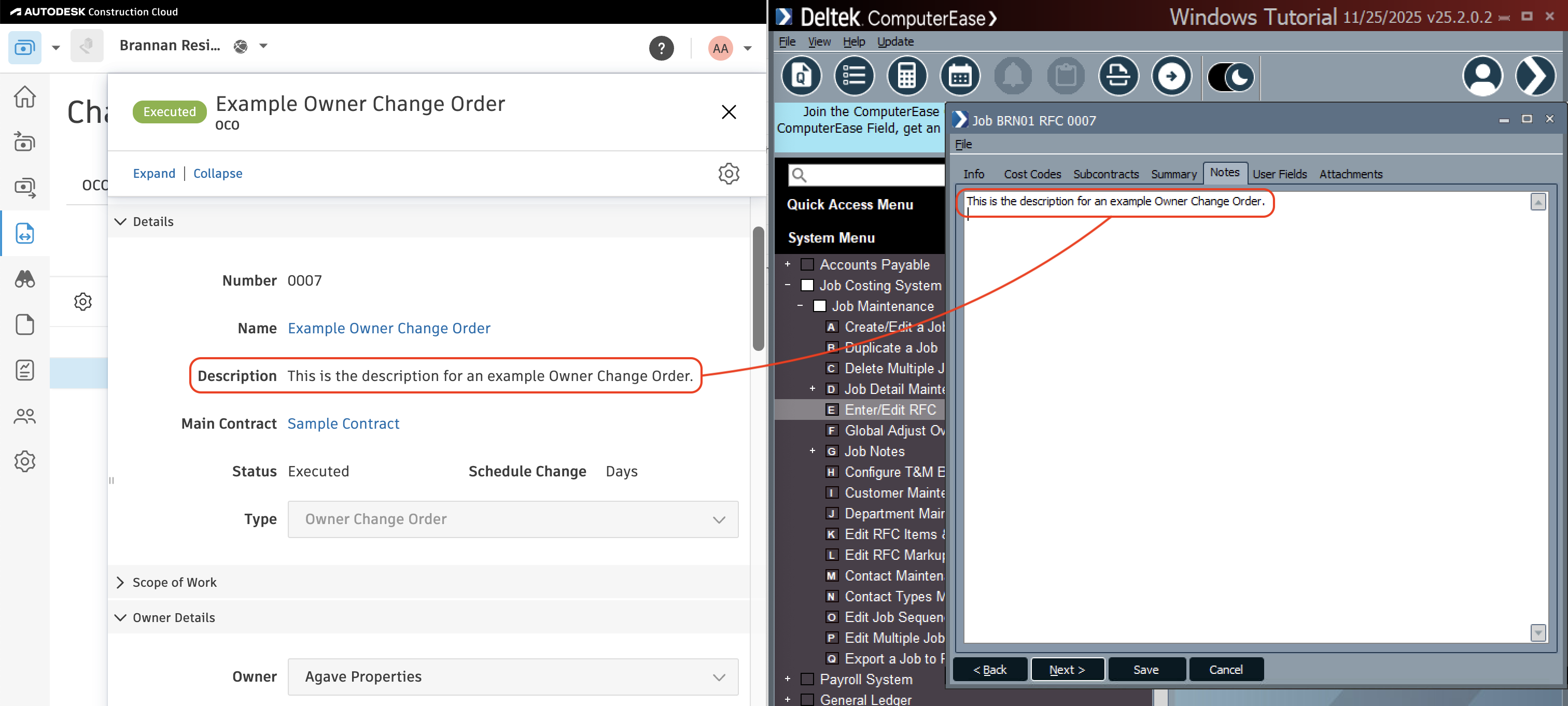
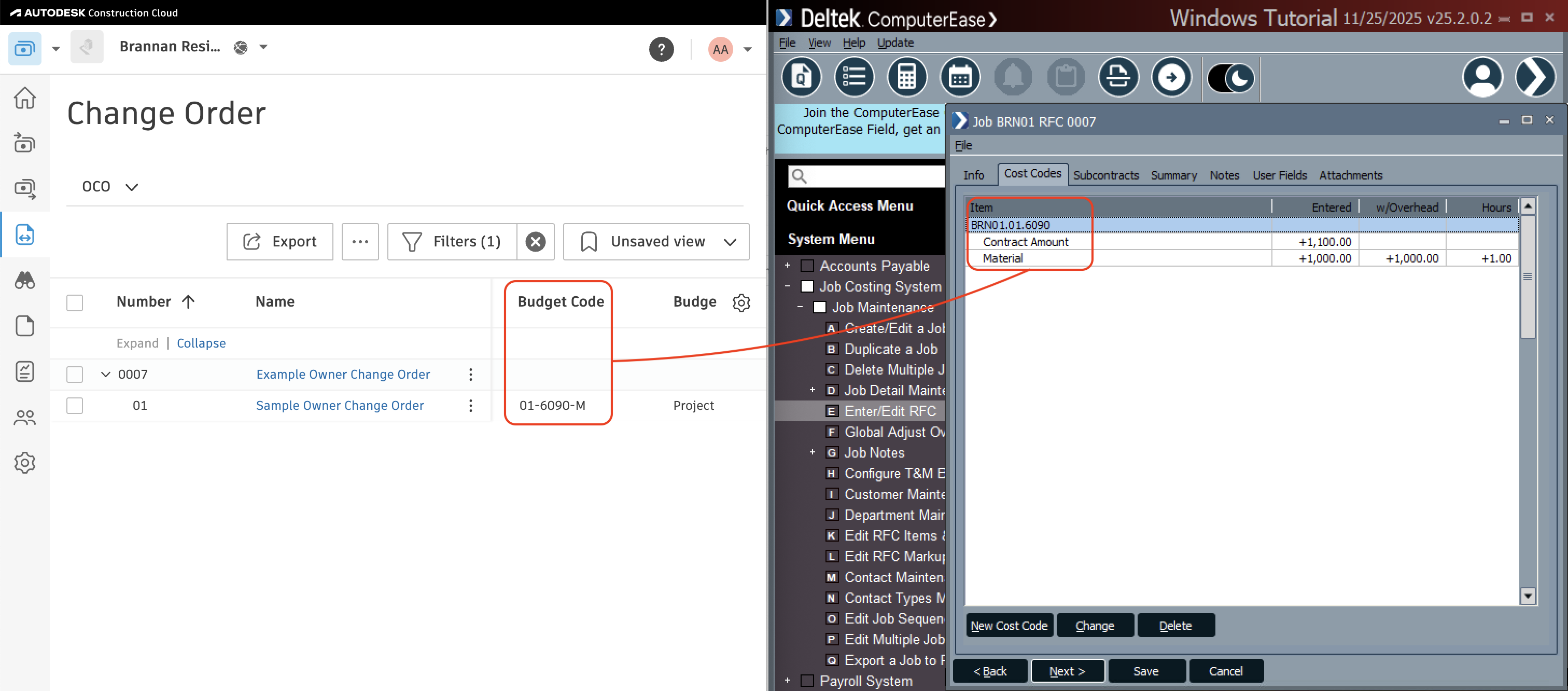
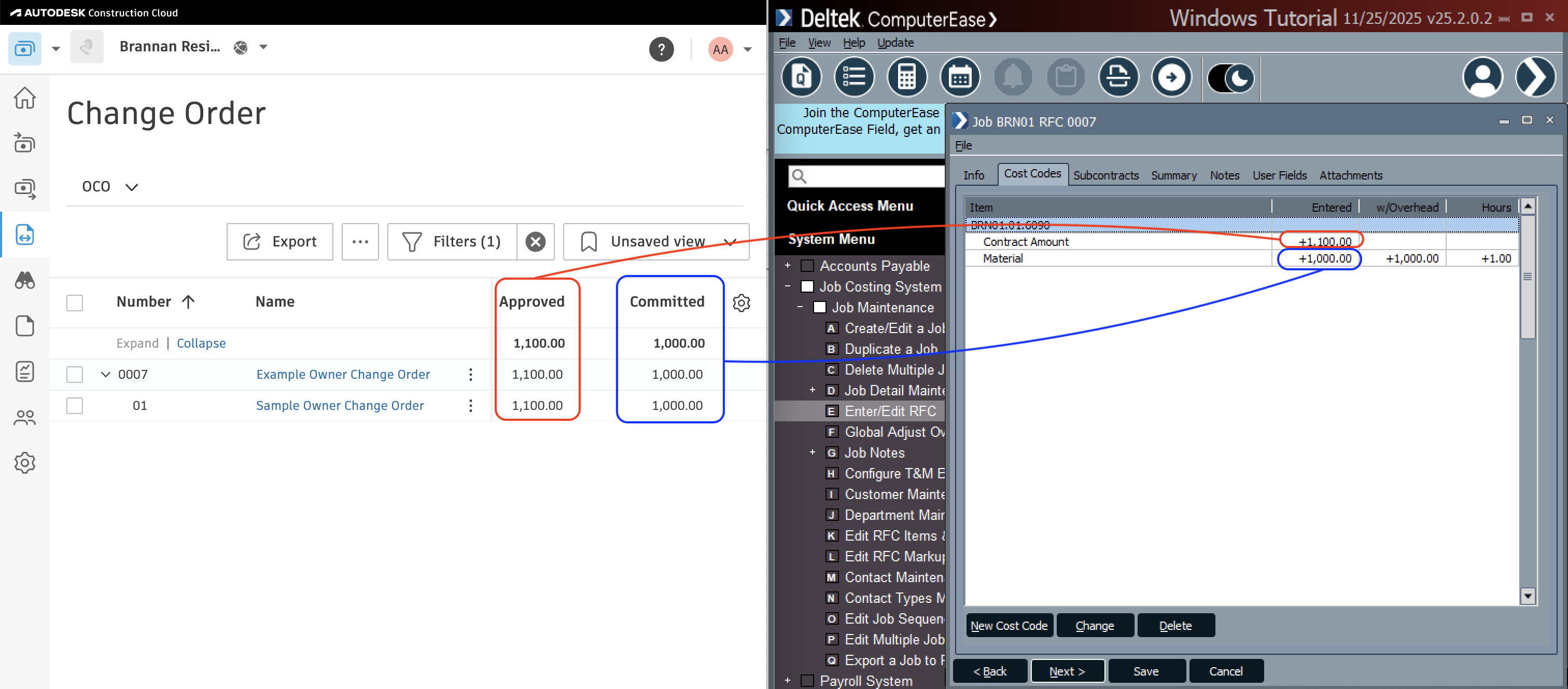
Agave Sync allows you to sync Autodesk Build Owner Change Orders to ComputerEase Job Request for Changes (RFCs).
Agave Sync exports Prime Contract Change Orders to ComputerEase with a type of Customer.
Visual Mapping
Common Errors and FAQs
Are there any pre-requisites to syncing Prime Contract Change Orders?
Yes, the Project, and any Sub Jobs (if used), Cost Codes, and Cost Types associated with the Prime Contract Change Order must be synced beforehand.
How can I differentiate changes to my ComputerEase Estimates vs. Contract when syncing Prime Contract Change Orders from Autodesk to ComputerEase?
You have a few options for controlling how revenue vs. cost updates flow into ComputerEase:
- Keep Contract and Budget in sync: Always set the Contract and Budget amounts to be equal. This keeps both figures aligned automatically.
- Filter by Cost Code: use a dedicated Cost Code (e.g., a “Fee” Cost Code) for revenue-only amounts. When mapped this way, any Change Order line items assigned to that Cost Code will only update the Contract in ComputerEase and will not affect the Budget.
- Filter by Cost Type: Use a dedicated Cost Type (e.g., a “Fee” Cost Type) for revenue-only amounts.Change Order line items using this Cost Type will update the Contract amount but will not modify the Budget in ComputerEase.
Does Agave also update AIA Schedule of Values in ComputerEase?
No - Agave does not sync Prime Contract Change Orders to update ComputerEase AIA Schedule of Values.
Does Agave Support Syncing Sub-items from Autodesk Build?
Yes, Agave supports syncing one level of sub-items from Autodesk Build for the following record types:
- Subcontracts
- Purchase Orders
- Change Orders
- AP Invoices
- Prime Contracts
- Prime Contract Change Orders
- AR Invoices
To enable syncing for sub-items, ask your Agave Account Manager to enable it for you.
How It Works
Autodesk Build records have a hierarchical structure with:
- Root items — parent line items
- Sub-items — child line items
- Sub-sub items — which are explicitly filtered out (only one level of nesting is supported)
Agave Sync will include root items and their direct sub-items when syncing. Any items nested deeper than one-level are excluded.
Differentiating Revenue and Cost Amounts When Syncing Owner Change Orders from Autodesk
When syncing Owner Change Orders from Autodesk to your ERP, you may want to separate cost and revenue amounts so that profit (i.e. revenue − cost) can be calculated correctly.
By default, a Change Order line item may generate both cost and revenue in the ERP. Agave Sync provides two ways to mark certain line items as revenue-only, meaning they generate revenue but no cost.
Available Approaches
1. Revenue-only Cost Code
A specific Cost Code can be configured as revenue-only.
- Line items using this Cost Code will:
- Generate revenue
- Not generate cost
- Configuration is enabled by your Agave Account Manager
Best used when:
- Markups, fees, or similar items are tracked using dedicated Cost Codes
- You want the rule to apply regardless of Cost Type
2. Revenue-only Cost Type
A specific Cost Type can be configured as revenue-only.
- Line items using this Cost Type will:
- Generate revenue
- Not generate cost
- Configuration is enabled by your Agave Account Manager
Best used when:
- Markups or fees are categorized by Cost Type (e.g.,
Markup,Fee) - You want consistent behavior across multiple Cost Codes
Important Notes
- These settings must be enabled by your Agave Account Manager
- Once configured, the rules are applied automatically during syncs