AP Payments
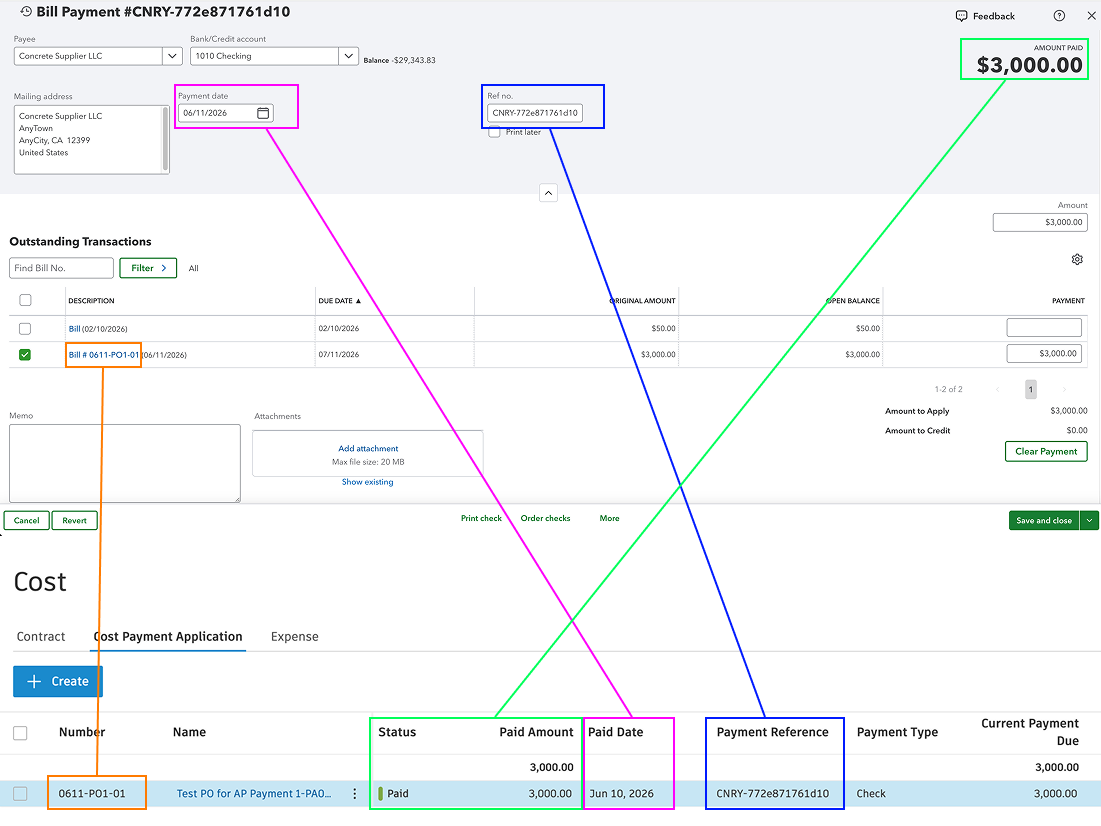
Agave Sync allows you to update the status Autodesk AP Invoices from Approved to Paid once it is marked as Paid in QuickBooks Online.
Visual Mapping
Video Tutorial
Common Errors and FAQs
Are there any pre-requisites to syncing AP Payments?
Yes - the Vendor, Project, and AP Invoice must be synced beforehand.
Does Agave update the AP Invoice status to be "Paid"?
Yes - when the total of all AP Payments matches the full amount of the AP Invoice, Agave will automatically update the invoice status to "Paid".
Why is my AP Invoice status still showing "Approved" even though I've synced the AP Payment?
There are two common reasons for this:
-
The payment amount does not exactly match the AP Invoice amount. This is usually caused by rounding differences between Autodesk Build and QuickBooks Online. If the totals are off by even a cent, the status change will not be triggered. To avoid this, update your Autodesk Build rounding settings to "Calculate on rounded values".
-
The AP Invoice has not been fully paid. If only a partial payment has been made in QuickBooks Online (for example, 50% of the invoice), the status will remain "Approved". Agave only updates the status to "Paid" once the total of all AP Payments matches the full AP Invoice amount in QuickBooks Online.